n8n Webhook Response and Respond to Webhook (Why the Caller Times Out)
<!-- Images live in the sibling folder n8n-respond-to-webhook-timeout/ next to this file: three-response-modes.png, timeout-path.png, ack-then-work.png. Body refs are filename-only. -->
The n8n Webhook node starts the workflow. It also decides when the HTTP caller gets an answer. Those are two different jobs.
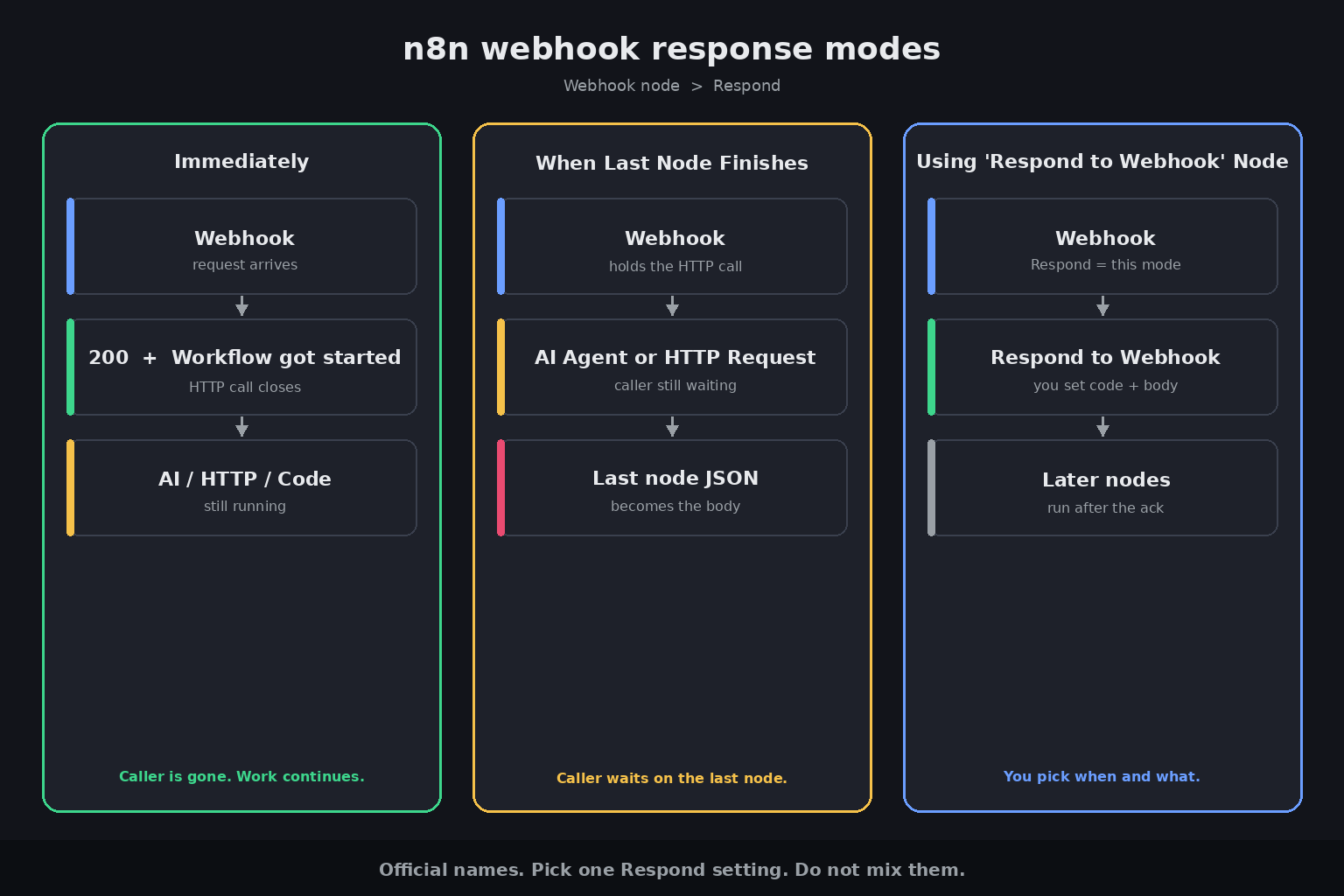
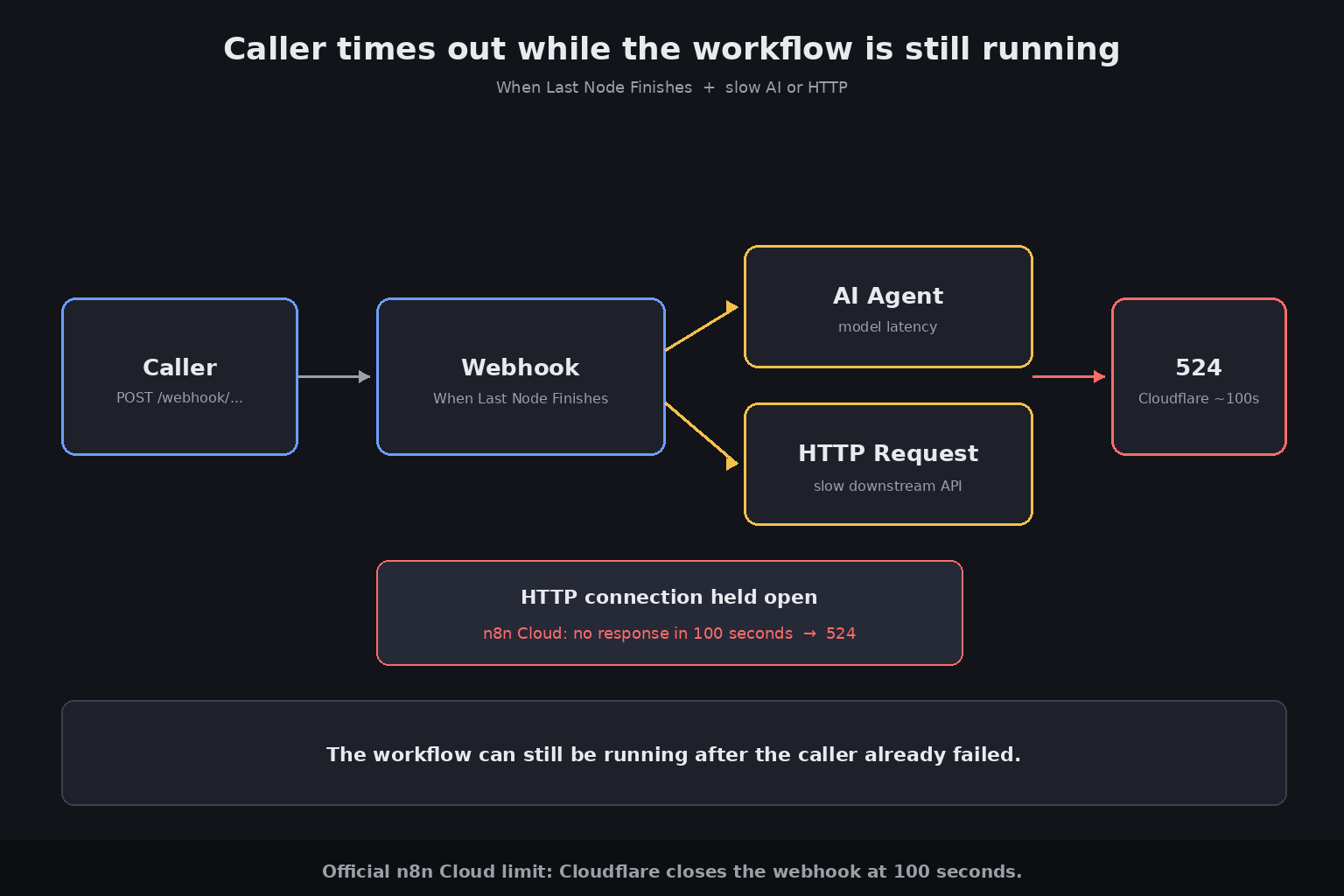
If Respond is Immediately, the caller gets a 200 and the text Workflow got started while the rest of the graph is still running. If Respond is When Last Node Finishes, the caller waits until the last executed node returns. An AI Agent or a slow HTTP Request on that path can sit past a gateway timeout. On n8n Cloud that gateway is Cloudflare. Official docs: if the webhook does not respond within 100 seconds, the request fails with a 524.
The Respond to Webhook node is the third option. It is not automatic. You set Respond to Using 'Respond to Webhook' Node, then place Respond to Webhook on the canvas.
You need <a href="https://n8n.partnerlinks.io/n8nchat" rel="sponsored">n8n Cloud or a self-hosted instance</a> to run any of this. That n8n link is a sponsored affiliate link.
Two URLs, then four Respond settings
The Webhook node shows two URLs at the top of the panel. Toggle Test URL and Production URL.
- Test URL: n8n registers it when you select Listen for Test Event or Execute workflow (workflow not active). The editor shows the incoming data. Official listening window is 120 seconds.
- Production URL: n8n registers it when you publish the workflow. The editor does not show the data. Open the Executions tab to inspect a run.
Callers that still hit /webhook-test/ after you publish will miss production traffic. Callers that hit /webhook/ while the workflow is unpublished get nothing useful.
Respond on the Webhook node has four official values:
- Immediately. Returns the response code and the message Workflow got started.
- When Last Node Finishes. Returns the response code and the data from the last node executed.
- Using 'Respond to Webhook' Node. Returns whatever the Respond to Webhook node defines.
- Streaming response. Streams data as the workflow runs. Needs nodes with streaming support, such as the AI Agent node.
This post is about the first three. Streaming is a different contract.
Immediately looks like success. The work is not done.
Immediately is an ack. The HTTP call is over. The workflow keeps going.
That is the right mode when the caller only needs to know the run started. Many form and payment senders retry if they do not get a fast 2xx. They do not want the model output in the same HTTP response.
The body is not your JSON. It is Workflow got started, unless you set Response Data or No Response Body on that mode. If a frontend expected { "ok": true, "id": "..." }, it will parse the wrong thing and look broken even though n8n is fine.
When Last Node Finishes waits on the whole graph
This mode holds the HTTP connection until the last node returns.
Put an AI Agent, an HTTP Request to a slow API, or a long Code node on that path and the caller waits with you. On n8n Cloud, Cloudflare closes the connection at 100 seconds and returns 524. Self-hosted setups often hit the same class of limit on nginx, Caddy, or another gateway. The workflow can still be running after the caller already failed.
Response Data on this mode only: All Entries, First Entry JSON, First Entry Binary, or No Response Body. The last node's output is the HTTP body.
That is how unexpected JSON leaks out.
- An HTTP Request with Never Error treats a 4xx or 5xx as a successful item. That item becomes the webhook body.
- An AI Agent that stayed green after a tool miss returns its own reasoning JSON. See the Error Workflow post.
- A Code node that returns
{ "error": "..." }without throwing is still a finished last node. The caller gets 200 and that object.
The last node is the response. If you did not mean that, change Respond.
Using 'Respond to Webhook' Node is the explicit ack
Set Respond to Using 'Respond to Webhook' Node. Add Respond to Webhook where the HTTP answer should leave.
Official behavior from the Respond to Webhook docs:
- The node runs once on the first incoming item.
- If the workflow finishes without executing it, n8n returns a standard message with status 200.
- If the workflow errors before the first Respond to Webhook, n8n returns an error message with status 500.
- A second Respond to Webhook after the first is ignored.
- If there was no webhook, the node is ignored.
Respond With options: All Incoming Items, Binary File, First Incoming Item, JSON, JWT Token, No Data, Redirect, Text. Set Response Code (200 or 202 for an ack) and headers there. Response Code on the Webhook node itself does not apply in this mode.
Place the node after the data you want in the body, and before the work the caller should not wait on.
Ack first, then process
Do not put the AI Agent or the slow HTTP Request on the HTTP critical path.
Two patterns work.
Same workflow. Webhook, then store or queue the payload, then Respond to Webhook with 200 or 202, then the Agent or HTTP Request. The caller is gone. The rest of the graph still runs.
Second workflow. Webhook 1 starts the job and acks. Webhook 2 (or a Schedule, or Execute Sub-workflow) does the work. Official Cloud docs describe the same idea as two webhooks: one to start and respond at once, one the caller polls for status.
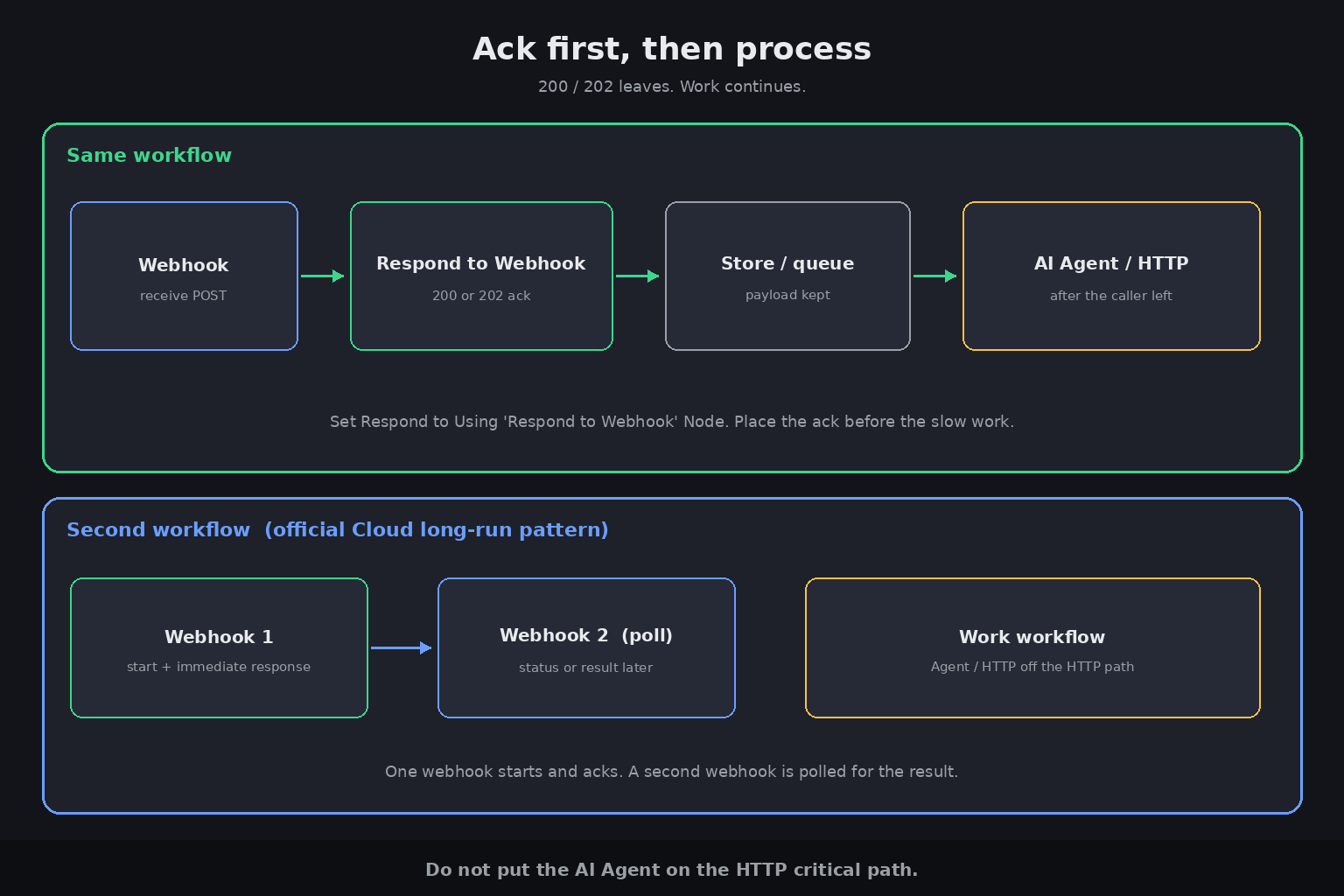
If the caller needs the model output in the same HTTP response, keep the run short, or stream, or poll. Do not wait on an Agent behind Cloudflare's 100 seconds.
A 403 is not a timeout
A timeout on Cloud is a 524. A 403 is something else.
IP(s) Allowlist on the Webhook node rejects addresses outside the list with 403. Behind a reverse proxy, set N8N_PROXY_HOPS or the allowlist sees the proxy, not the caller.
A different 403 showed up in community topic 308473 (host_not_allowed / x-deny-reason). That thread is an HTML page served by one webhook calling a sibling webhook after n8n started wrapping HTML responses in a sandboxed iframe (1.103.0, later Cloud builds). It is not a response-mode mismatch. Do not treat it as a timeout fix.
Scaffold the ack on the workflow you have open
n8nChat does not replace the Webhook node. It does not host n8n. It is a Chrome and Firefox extension. You open your own n8n canvas, type a prompt, and it places a graph there. Bring your own OpenAI or Gemini key. See the homepage, the workflow builder, the blog, and the changelog.
The open workflow is the context. Ask what is wrong with the Webhook Respond setting. Tell it to insert Respond to Webhook and move the Agent off the HTTP path.
On the workflow you have open:
> This webhook returns 200 with "Workflow got started" while the caller expected the Agent JSON. Set Respond to Using 'Respond to Webhook' Node. Add Respond to Webhook after the receive step with 202. Keep the AI Agent after that.
> The production URL times out. The last node is an HTTP Request. Move the response in front of that request and return 200 first.
> Split ack vs work. Webhook receives POST, Respond to Webhook returns 202 JSON {accepted: true}, then the HTTP Request and Agent run.
Then review every node, add your own credentials, publish so the Production URL is live, and hit that URL, not the Test URL. Install from the Chrome Web Store or Firefox Add-ons.
Frequently asked questions
Why does my n8n webhook return 200 before the workflow finishes?
Respond is set to Immediately. That mode returns the response code and the text "Workflow got started" as soon as the run starts. The rest of the graph keeps going after the HTTP call is already closed.
What is the difference between Immediately, When Last Node Finishes, and Using 'Respond to Webhook' Node?
Immediately acks with "Workflow got started". When Last Node Finishes holds the HTTP call until the last executed node returns, and that node's data is the body. Using 'Respond to Webhook' Node sends the status and body you set on a Respond to Webhook node.
Why does the caller time out around 100 seconds on n8n Cloud?
n8n Cloud sits behind Cloudflare. Official Webhook docs say if the webhook does not respond within 100 seconds, the request fails with a 524. When Last Node Finishes plus a slow AI Agent or HTTP Request hits that limit. The workflow can still be running after the caller already failed.
Should I wait for an AI Agent or HTTP Request before I respond?
Not if the caller has a gateway timeout. Ack first with Immediately or Respond to Webhook (200 or 202), then run the Agent or HTTP Request after the response, or in a second workflow the caller can poll.
What is the difference between the Test URL and the Production URL?
The Test URL registers when you select Listen for Test Event or Execute workflow while the workflow is not active. It shows data in the editor and listens for 120 seconds. The Production URL registers when you publish. Inspect those runs in the Executions tab.
Why is the webhook body unexpected JSON instead of the payload I wanted?
When Last Node Finishes uses the last executed node as the HTTP body. An HTTP Request with Never Error, a green AI Agent, or a Code node that returned an error object without throwing will all become that body. Use Respond to Webhook if you need a body you wrote.
Can n8nChat replace Respond to Webhook?
No. n8nChat is a Chrome and Firefox extension that places a graph on the official n8n canvas. It does not host n8n and it does not answer HTTP callers. Use it to add the node and split ack vs work, then publish and hit the Production URL.
Build workflows with the n8nChat Chrome extension. Also see n8n AI and the n8n workflow builder.