n8n Schedule Trigger Runs at the Wrong Time: Timezone, Publish, and Missed Runs
<!-- Images: hero.png, publish-timing.png, interval-alignment.png, wrong-time-checklist.png -->
A Schedule Trigger set to 9:00 fires at 9:00 in exactly one timezone. If you never chose that zone on purpose, n8n chose it for you, and the run lands hours early or late.
One community member summed up the bug after a client got a morning digest at 1 AM: "the cron is evaluated in a zone nobody configured on purpose" (community.n8n.io thread).
This guide covers how n8n picks the zone, where to set it on Cloud and self-hosted, why edits do not apply until you publish, how the n8n 2.45 scheduler changes interval timing, and what to check when a schedule never runs. You need n8n Cloud or self-hosted n8n to follow along. That n8n link is a sponsored affiliate link.
Which timezone the Schedule Trigger uses
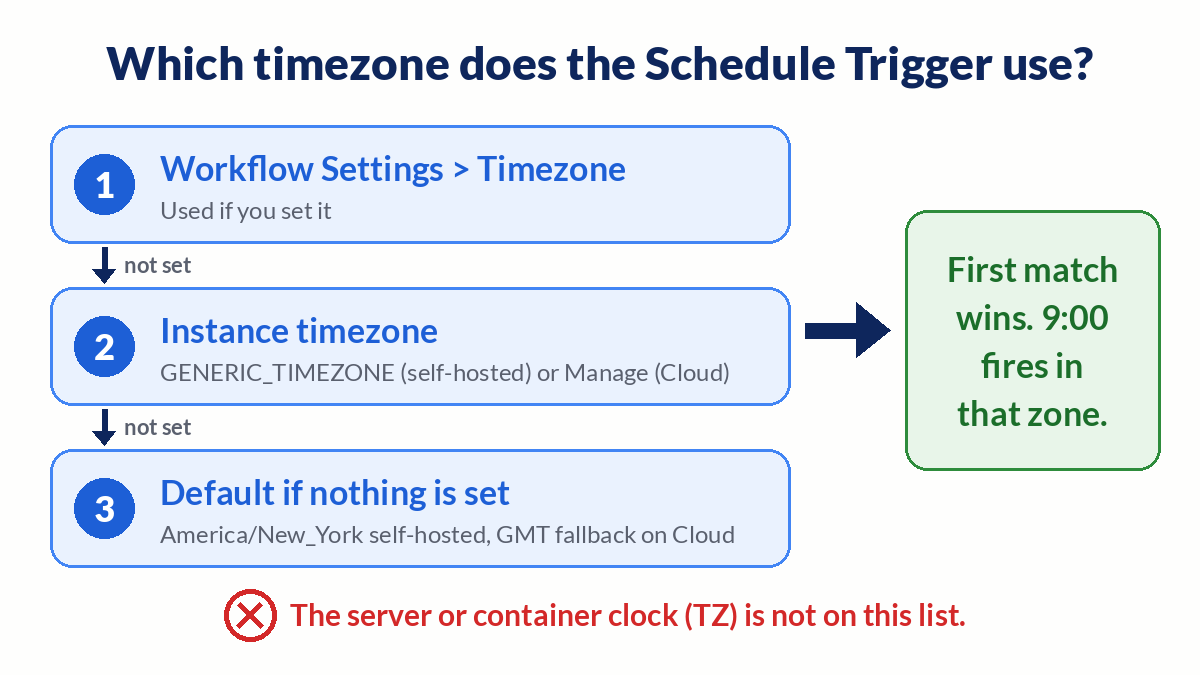
The Schedule Trigger docs give a two-step order, and the first match wins:
- Workflow timezone, if you set one in the workflow's Settings.
- Instance timezone, if the workflow has none.
On self-hosted n8n the instance timezone comes from GENERIC_TIMEZONE. If that variable is unset, the default is America/New_York. On n8n Cloud, n8n tries to detect the owner's timezone at signup and falls back to GMT.
The container clock is not on that list. In the same thread, another member corrected a common assumption: "The documented self-hosted default is America/New_York, rather than automatically inheriting the container timezone." A server in UTC running n8n with no GENERIC_TIMEZONE schedules in New York time.
Fix 1: Set the workflow timezone
This is the most targeted fix, and the right one when a single instance serves teams or clients in different zones.
- Open the workflow on the canvas.
- Open the Workflow menu (three dots, upper right) and select Settings.
- Change Timezone to the zone the schedule should follow, for example
America/Los_Angeles. - Select Save. If the workflow is already live, publish it again so the trigger picks up the change.
The setting also affects Luxon dates inside that workflow, which matters for the "today" and "yesterday" math in reports.
Fix 2: Set the instance timezone
Set the instance zone so every new workflow starts with the right default.
n8n Cloud: on your dashboard, select Manage, then change the Timezone dropdown (Cloud timezone docs).
Self-hosted Docker: set both variables to the same IANA zone, as n8n's Docker Compose example does:
services:
  n8n:
    image: n8nio/n8n
    environment:
      - GENERIC_TIMEZONE=America/Los_Angeles
      - TZ=America/Los_Angeles
Recreate the container after you change environment variables (docker compose up -d does this when the config changed). The same restart trap shows up with webhook URLs, covered in the N8N_WEBHOOK_URL guide. Then check the next run of one scheduled workflow. If the timing did not move, unpublish and publish it again.
| Setting | What it controls | Where to set it |
|---|---|---|
| Workflow Timezone | Schedule Trigger and Luxon dates for one workflow | Workflow menu → Settings |
GENERIC_TIMEZONE | Default zone for schedules on a self-hosted instance | Environment variable |
TZ | System clock for scripts and commands like date | Container environment |
| Cloud Timezone | Default zone for a Cloud instance | Dashboard → Manage |
Check the time inside the workflow
A schedule can fire on time while the data it reports looks wrong. The Luxon page in the n8n docs states that plain JavaScript Date() does not respect the workflow timezone. $now and $today do.
Add a Set node right after the trigger (or ask n8nChat in the n8n editor to add one) and log what n8n thinks the time is:
{{ $now.toISO() }}returns the time with its UTC offset.{{ $now.zoneName }}returns the zone name, such asAmerica/Los_Angeles.{{ $now.setZone('Europe/Berlin').toFormat('yyyy-MM-dd HH:mm') }}formats for a reader in another zone.
If the first run logs the offset you expected, the timezone half of the problem is solved. Store the intended reporting date as its own field too. A late retry should still report on the day it was meant for.
Changes apply when you publish
The Schedule Trigger common issues page lists three behaviors that catch people after an edit:
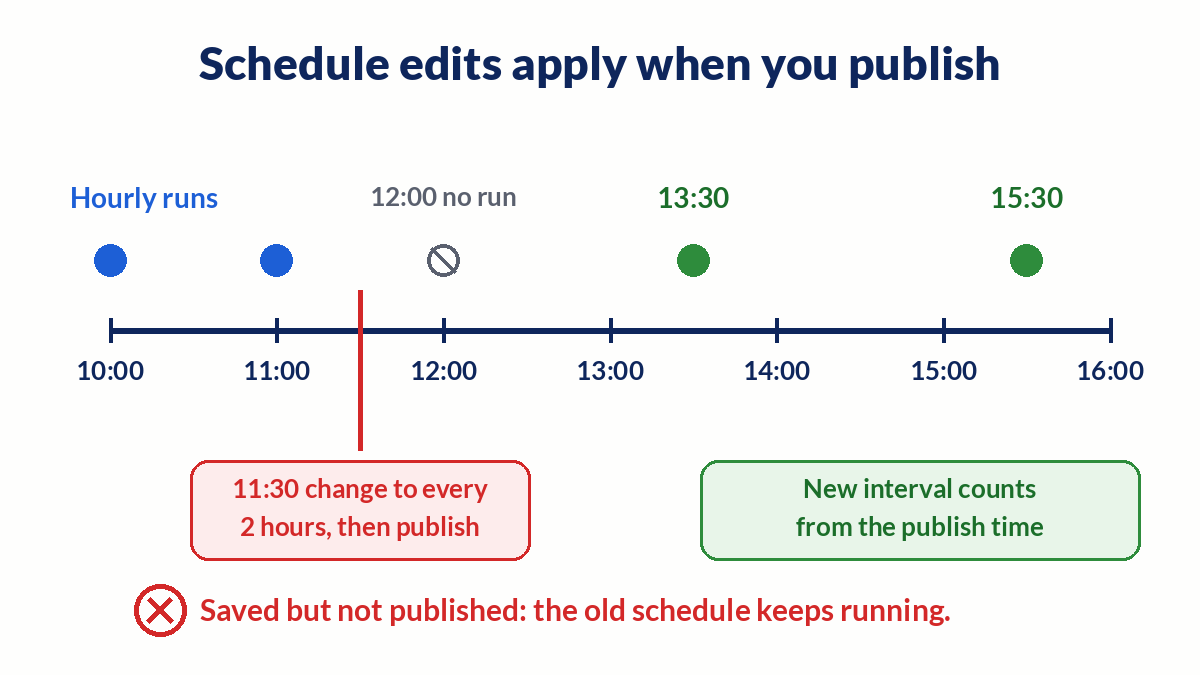
- A new interval takes effect only after you publish a new version of the workflow.
- Expressions and variables in the trigger are evaluated once, at publish time. Change a variable later and the schedule stays the same until you unpublish and publish again.
- The schedule restarts from the publish moment. An hourly job due at 12:00, switched to every 2 hours and republished at 11:30, next runs at 13:30.
Because expressions are frozen at publish, Math.random() in the trigger does not give you a random time each day. Put a short Wait node after the trigger if you need jitter inside a run. The Wait node guide covers how waits behave.
Every N minutes fires at odd minutes on n8n 2.45
n8n 2.45.0 turns on the durable scheduler by default. As of October 20, 2026, 2.45.0 is the beta release on npm and 2.44.x is stable, so check your version before you rely on this section.
Under the new default, Seconds and Minutes intervals run at fixed gaps counted from the moment you published. Publish at 10:07 with "every 15 minutes" and runs land at 10:22, 10:37, and so on.
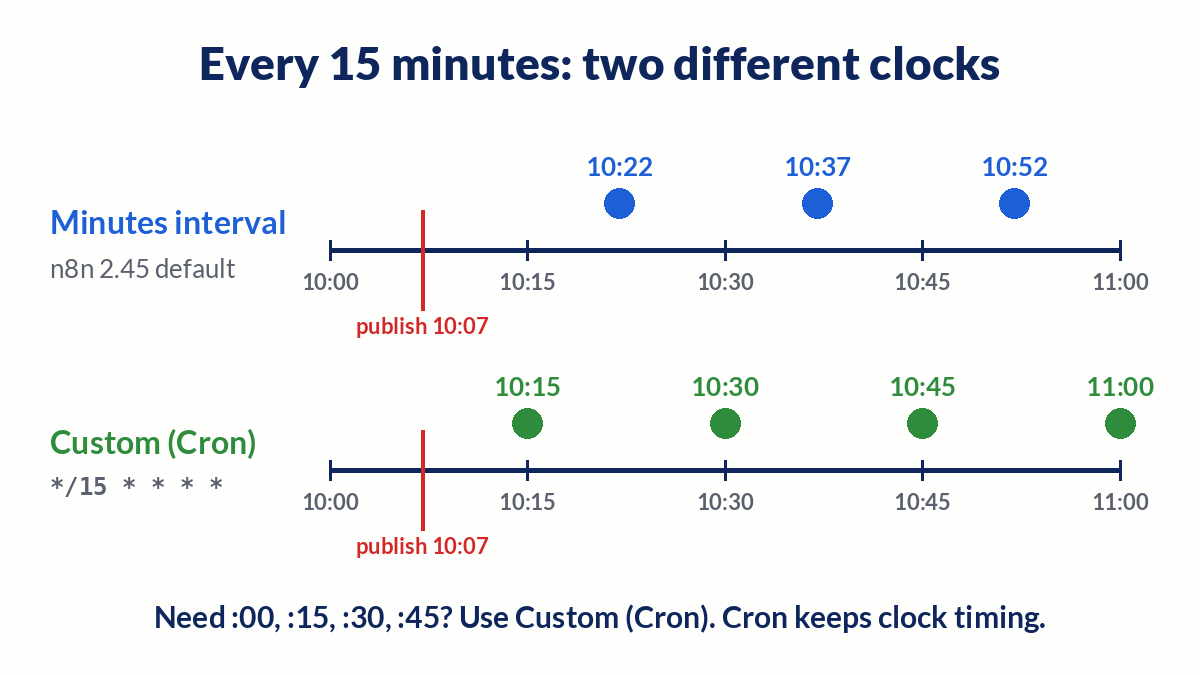
If you need runs at :00, :15, :30, and :45, switch Trigger Interval to Custom (Cron) and use */15 * * * *. Cron intervals keep clock timing. Self-hosted admins can also set N8N_SCHEDULER_TRIGGER_NODE_MODE=legacy, but n8n has deprecated that mode.
Hours, Days, Weeks, and Months intervals fire as before. The docs add that the durable scheduler handles daylight saving transitions more correctly than the in-memory scheduler did. A job that must run exactly once a day still belongs outside the hour your zone skips or repeats.
The schedule never ran
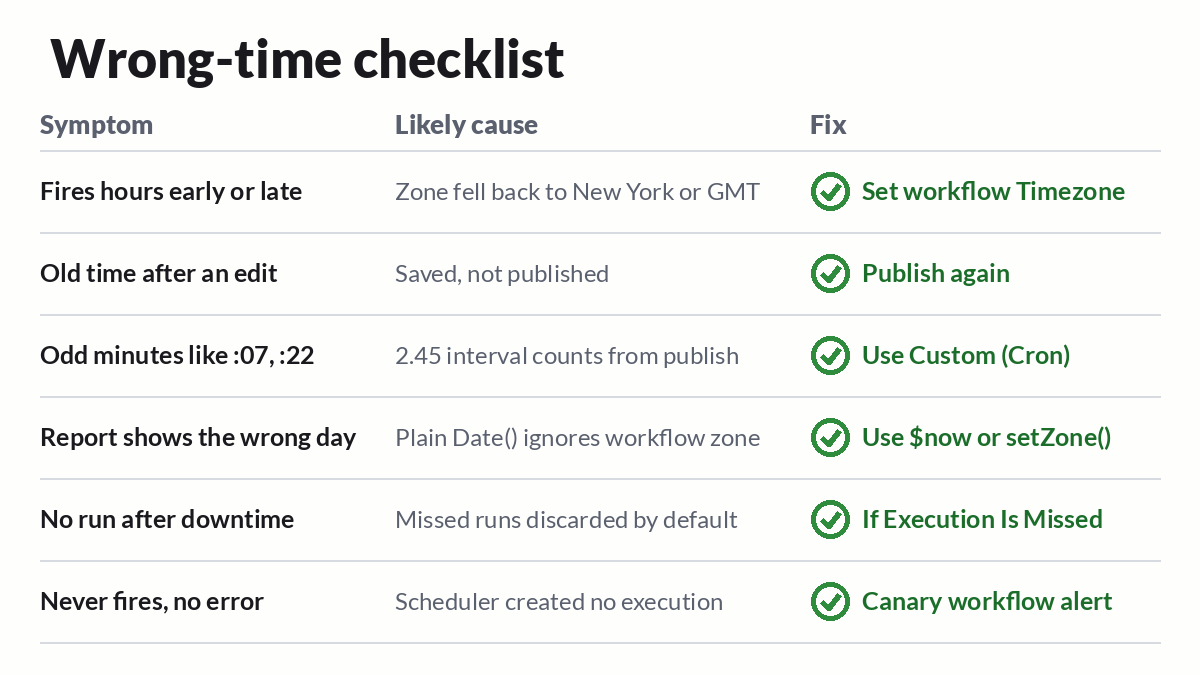
Work through these in order:
- Published? The docs require you to save and publish a workflow that starts with a Schedule Trigger.
- Day 31. A Months interval set to day 31 does not fire in shorter months. Day 30 skips February.
- Cron syntax. n8n accepts an optional sixth field for seconds at the front. Remove it and test the rest on crontab guru if you see "Invalid cron expression".
- Instance downtime. By default, missed runs are discarded. With the durable scheduler, a Schedule Trigger added from n8n 2.36 on has If Execution Is Missed in its Settings tab. Pick Run the Most Recent Missed Execution for one catch-up run.
- Silent scheduler stalls. If the scheduler never creates an execution, nothing fails. Your Error Workflow will not fire. Run a tiny canary workflow that writes a timestamp every few minutes, and alert when it goes stale.
Debug the schedule on your canvas
n8nChat is a browser extension that works on the official n8n canvas. Open the scheduled workflow and ask why it fires at 6 AM instead of 9 AM. It reads the open workflow as context, so you can tell it to switch the trigger to a cron expression or add a Set node that logs $now.toISO(). You can also describe a new job in a prompt, such as "every weekday at 9 AM Los Angeles time, pull yesterday's orders and post a summary", and it builds the graph on the canvas.
It runs on your own OpenAI or Gemini key. It does not replace n8n, and it cannot change your instance timezone or environment variables for you. See AI for n8n, the workflow builder, the Chrome extension page, and the changelog. Install for Chrome or Firefox.
Disclosure: the n8n link in this post is an affiliate link. If you sign up through it, n8nChat may earn a commission at no extra cost to you.
Frequently asked questions
Which timezone does the n8n Schedule Trigger use?
The workflow timezone from workflow Settings, if you set one. If not, it uses the instance timezone. Self-hosted instances default to America/New_York when GENERIC_TIMEZONE is unset. n8n Cloud tries to detect the owner's timezone at signup and falls back to GMT.
Does n8n pick up the timezone of my server or Docker container?
Not for schedules. The Schedule Trigger reads GENERIC_TIMEZONE, not the container clock. TZ sets the system timezone for scripts and commands like date. n8n's Docker Compose example sets both to the same value.
I changed the schedule but it still runs at the old time. Why?
Schedule changes take effect when you publish. Saving is not enough. Expressions in the trigger are also evaluated once at publish time, so unpublish and publish again after you change a variable.
Why does my every 15 minutes trigger fire at odd minutes like :07 and :22?
From n8n 2.45.0, Seconds and Minutes intervals run at fixed gaps counted from the moment you published. Use Custom (Cron) with */15 * * * * if you need runs on clock boundaries. Cron intervals keep clock timing.
Will n8n run a schedule it missed while the instance was down?
Only with the durable scheduler and a Schedule Trigger added from n8n 2.36 on. Set If Execution Is Missed to Run the Most Recent Missed Execution. The default discards missed runs. The in-memory scheduler never runs them.
Why do $now and new Date() show different times in a Code node?
$now is a Luxon DateTime that follows the workflow timezone. Plain JavaScript Date does not respect the workflow timezone setting. Use $now or DateTime.setZone() when you format times for people.
Can an Error Workflow alert me when a schedule never fires?
No. If the scheduler never starts an execution, nothing fails, so the Error Trigger has nothing to catch. Use a small canary workflow that writes a timestamp on a schedule and alert when it goes stale.
Build workflows with the n8nChat Chrome extension. Also see n8n AI and the n8n workflow builder.