n8n Telegram Trigger Not Working: Fix Test vs Production, Groups, and Duplicates
<!-- Images live in the sibling folder n8n-telegram-trigger-not-working/: hero.png, getwebhookinfo-decision.png, group-privacy-mode.png, fix-checklist.png. Body refs are filename-only. -->
The Telegram Trigger is one of the most common reasons people open a help thread on the n8n forum. The pattern repeats. The bot replies when you click Execute workflow. You publish, close the tab, and nothing happens. The Executions list stays empty.
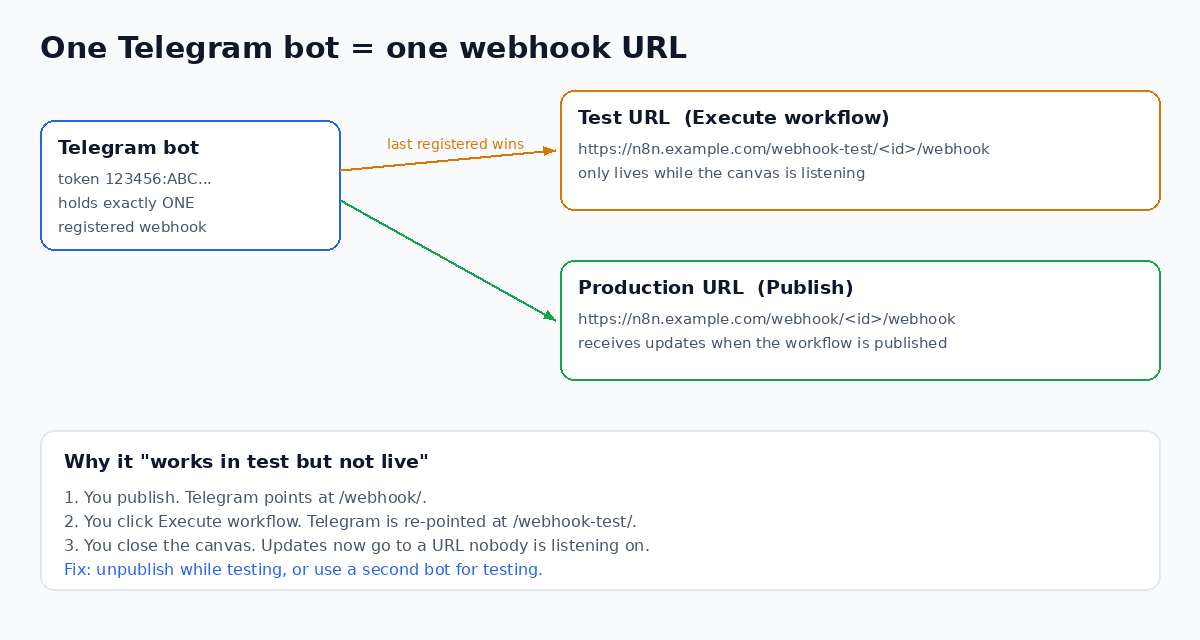
Almost every case comes down to one fact: a Telegram bot holds exactly one webhook URL at a time. n8n test runs and published runs use different URLs, and whichever registered last wins.
This guide walks through the fixes in the order that saves the most time. You need n8n Cloud or a self-hosted n8n instance to follow along. That n8n link is a sponsored affiliate link.
Check the Executions list first
Production runs do not light up the canvas. They only appear in the Executions list for the workflow. Before you change anything, send the bot a message and refresh Executions.
If a run is there, the trigger works. The problem is downstream, often a Switch node fallback or a Send Message node with the wrong chat ID. With the workflow open, you can ask n8nChat's AI side panel to trace the branch and point out the node that drops the message.
Why test mode steals the webhook
When you publish a workflow, n8n registers the production URL with Telegram. It looks like https://your-host/webhook/<id>/webhook.
When you click Execute workflow or Execute step on the trigger, n8n registers the test URL instead. It contains /webhook-test/. That URL only exists while the editor is listening. Close the canvas and Telegram keeps sending updates to a URL nobody serves.
The official Telegram Trigger common issues page confirms this and gives two workarounds:
- Unpublish while you test. Test on the test URL. Publish again when done. Do not click Execute after publishing.
- Use a second bot for testing. Create another bot in BotFather, save its token as a separate Telegram credential, and use it while you build. Swap the live credential back before you publish.
Option 2 is the one that stops the problem from coming back.
Read getWebhookInfo before you change anything
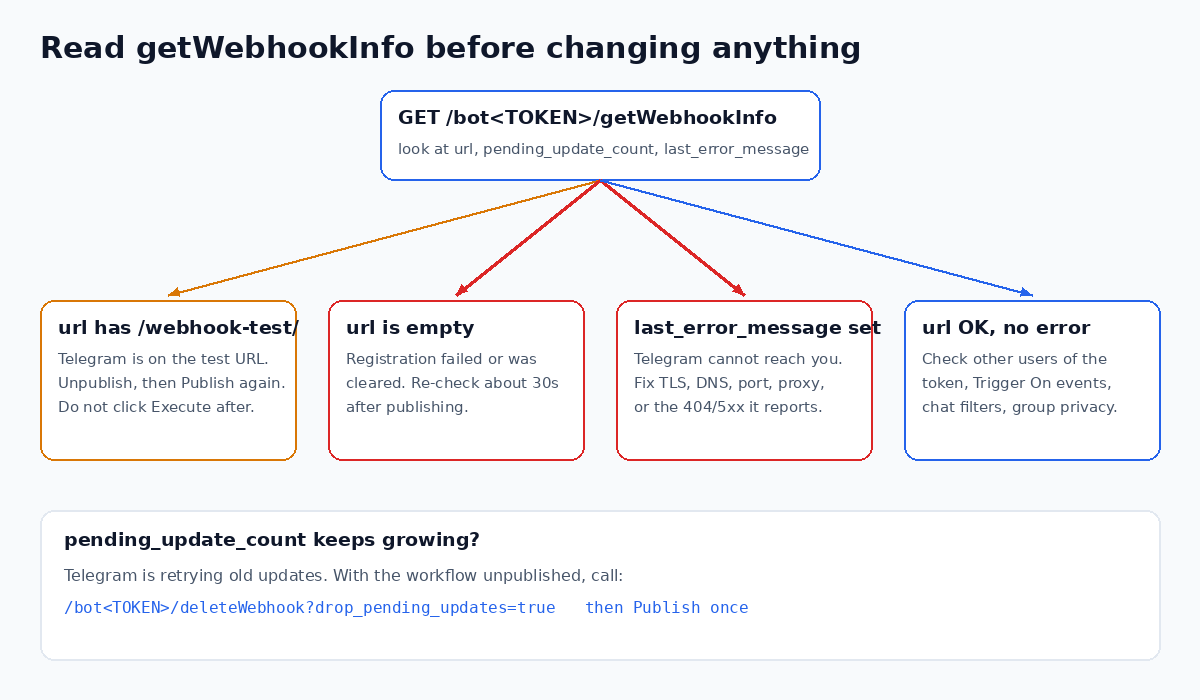
Telegram will tell you exactly where it is sending updates. Open this in a browser, or in an HTTP Request node with method GET:
https://api.telegram.org/bot<YOUR_TOKEN>/getWebhookInfoKeep the word bot before the token. Treat the token like a password. Do not paste it into public threads.
Look at three fields:
- url contains `/webhook-test/`. Telegram is still on the test URL. Unpublish, publish again, and leave the trigger alone.
- url is empty. Registration failed or was cleared. Forum users report cases where the URL clears itself seconds after publishing, so check again about 30 seconds later, not right away.
- last_error_message is set. Telegram cannot reach your instance. The message names the reason, such as an SSL problem, a timeout, or a 404. Re-registering will not fix a network problem.
If pending_update_count keeps growing, Telegram is retrying old updates. Clear the queue with the workflow unpublished:
https://api.telegram.org/bot<YOUR_TOKEN>/deleteWebhook?drop_pending_updates=trueRun getWebhookInfo again. The url should be empty. Now publish once. n8n registers a fresh production webhook. Without drop_pending_updates=true, a day of queued messages can fire all at once and your bot will reply to every one.
Self-hosted: Telegram needs a public HTTPS URL
The error Bad Request: bad webhook: An HTTPS URL must be provided for webhook means n8n is offering Telegram an http:// or localhost address.
Behind a reverse proxy, terminate TLS at the proxy and set the public base URL. Our guide on N8N_WEBHOOK_URL and WEBHOOK_URL covers the variables and proxy hops in detail. Restart n8n after the change, then unpublish and publish the workflow so the new URL is registered.
Two more checks from the Telegram Bot API docs:
- Webhooks only work on ports 443, 80, 88, and 8443.
- While a webhook is set,
getUpdatespolling does not work. A leftover polling script will not receive messages, and it can confuse your testing.
If test mode hangs on "waiting for trigger event", the n8n docs point at reverse proxies without websocket support. Enable websocket proxying in Nginx, Caddy, or Traefik.
The bot is silent in a group
This one has nothing to do with webhooks. Telegram bots start with privacy mode on. In groups, the bot then only receives commands, replies to its own messages, and messages that mention it.
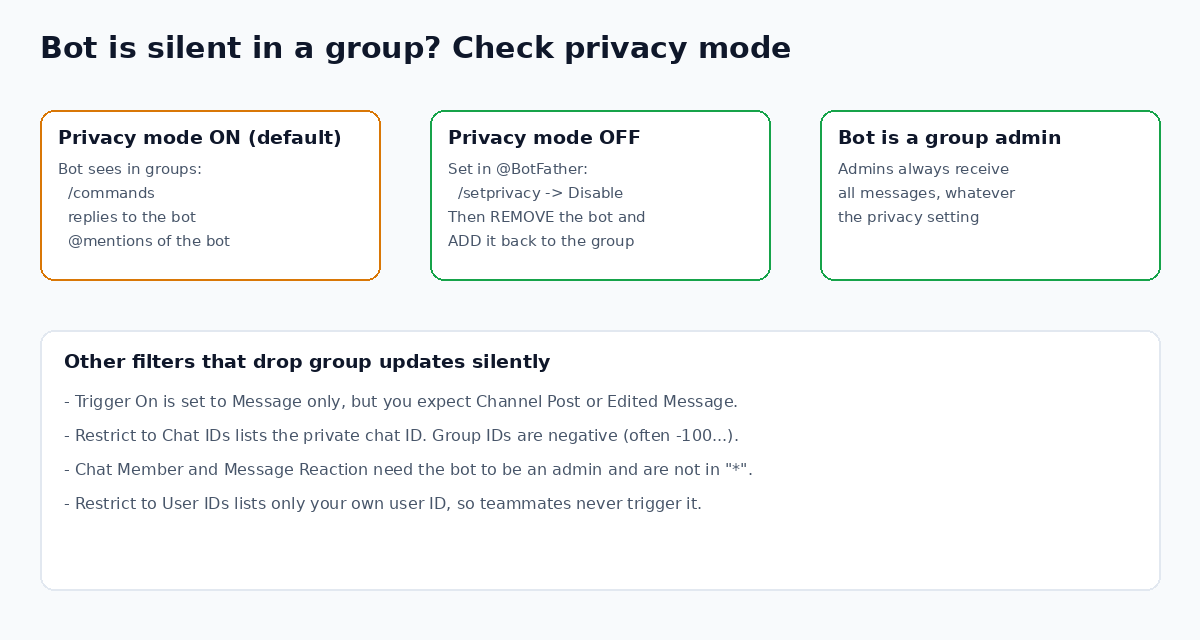
You have two fixes, both from Telegram's bot features docs:
- Send
/setprivacyto BotFather and disable it. Then remove the bot from the group and add it back. The change does not apply until you do. - Make the bot a group admin. Admin bots always receive all messages.
Then check the trigger settings. Trigger On must include the update type you expect. Channel posts and edited messages are separate events from Message. Chat Member and Message Reaction updates require the bot to be an admin. If you set Restrict to Chat IDs, remember group IDs are negative numbers. A filter with only your private chat ID drops every group message without an error.
Stop duplicate executions
If one message creates two or three executions, look for more than one consumer of the same token:
- A copied workflow that is also published
- A second n8n instance, such as an old trial or a local Docker install
- An external script using the same bot
Each copy fights over the webhook or processes the same update. Keep one published Telegram Trigger per bot token. If the trigger then hands off to slow work, like an AI Agent, the Respond to Webhook timeout guide explains why fast acknowledgement matters for any webhook caller.
When the trigger will not publish at all
A forum user on n8n Cloud 2.34.4 hit Cannot read properties of undefined (reading 'url') when publishing, even with a clean getWebhookInfo. n8n replied that it opened an internal ticket for it. First check the credential. The Base URL should be exactly https://api.telegram.org and the Access Token should contain only the token.
If it still fails, a community workaround is a plain Webhook node:
- Add a Webhook node, set HTTP Method to POST, and publish.
- Copy the Production URL and register it once:
https://api.telegram.org/bot<TOKEN>/setWebhook?url=<PRODUCTION_URL>. - Read the message from
$json.body.message.textand the chat from$json.body.message.chat.id.
You lose the Trigger node's built-in secret check, so add one. Pass &secret_token=<random> to setWebhook, and compare the X-Telegram-Bot-Api-Secret-Token header in an If node before doing any work.
The full checklist
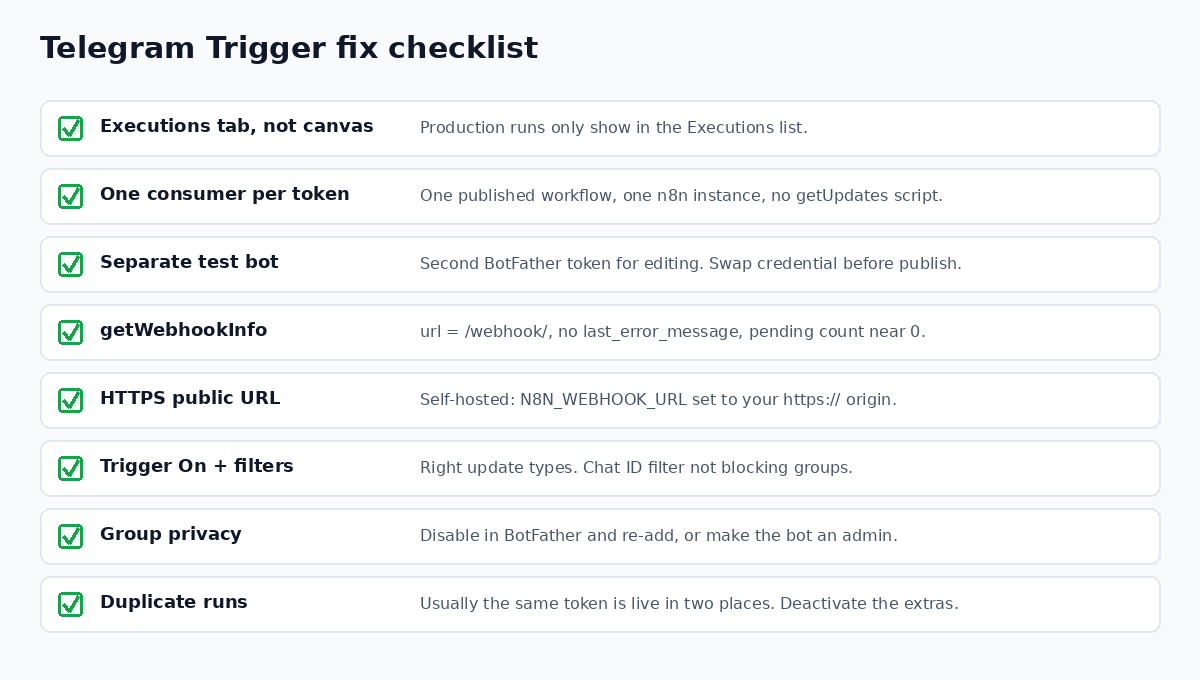
Wire a failure path too. An error workflow catches runs that start but break later, so a Telegram bot does not go quiet without anyone noticing.
Debug the workflow with the canvas open
Telegram problems often sit next to workflow problems: a Switch node with no fallback, a hardcoded chat ID, or an AI Agent that never sends a reply. n8nChat is a browser extension that works on the official n8n canvas. Open the workflow, ask what is wrong with the Telegram branch, and tell it to fix the graph. It can also build a new workflow from a prompt, like "Telegram Trigger to AI Agent to Send Message with a reply to the same chat."
It runs on your own OpenAI or Gemini API key. It does not replace n8n or change how Telegram registers webhooks. See AI for n8n, the workflow builder, and the changelog. Install it for Chrome or Firefox, or read more on the Chrome extension page.
Disclosure: the n8n link in this post is an affiliate link. If you sign up through it, n8nChat may earn a commission at no extra cost to you.
Frequently asked questions
Why does my n8n Telegram Trigger work in test mode but not after I publish?
Telegram stores one webhook URL per bot. Clicking Execute workflow re-points the bot at the /webhook-test/ URL, which only exists while the canvas listens. Unpublish, publish again, and do not click Execute afterward. Or use a second bot for testing.
How do I see which webhook URL Telegram has for my bot?
Open https://api.telegram.org/bot<TOKEN>/getWebhookInfo in a browser or an HTTP Request node. Check url, pending_update_count, and last_error_message. Keep the token private, since anyone with it controls the bot.
Why is my Telegram bot silent in a group?
Privacy mode is on by default. The bot then only sees commands, replies to it, and mentions. Disable it with /setprivacy in BotFather and re-add the bot to the group, or make the bot a group admin. Also check the Restrict to Chat IDs option.
Why does the Telegram Trigger run the same message two or three times?
Usually the same bot token is live in more than one place: a copied workflow, a second n8n instance, or another script. Telegram also retries when it does not get a successful response. Keep one published consumer per token.
What does 'An HTTPS URL must be provided for webhook' mean?
Telegram only accepts HTTPS webhook URLs. On self-hosted n8n behind a reverse proxy, terminate TLS at the proxy and set N8N_WEBHOOK_URL to your public https:// address, then restart n8n and publish again.
Is it safe to call deleteWebhook?
Yes, with the workflow unpublished. Use deleteWebhook?drop_pending_updates=true to also clear queued updates, so old messages do not all fire at once. Publishing the workflow registers a fresh production webhook.
Which ports can a Telegram webhook use?
Telegram's Bot API supports webhooks on ports 443, 80, 88, and 8443. If your public n8n URL uses another port, Telegram will not deliver updates. Most setups use 443 behind a reverse proxy.
Build workflows with the n8nChat Chrome extension. Also see n8n AI and the n8n workflow builder.