n8n Loop Over Items Out of Memory: Use Execute Sub-workflow
<!-- Images live in the sibling folder n8n-loop-over-items-out-of-memory/: hero.png, loop-alone-trap.png, subworkflow-pattern.png, oom-checklist.png. Body refs are filename-only. -->
You drop Loop Over Items (Split in Batches) on a 10k-row job, set a small batch size, and still watch the host die. On self-hosted Docker the execution UI may show nothing useful. Logs say JavaScript heap out of memory. The fix is not "add another Loop." It is Execute Sub-workflow with a tiny return to the parent.
You need <a href="https://n8n.partnerlinks.io/n8nchat" rel="sponsored">n8n Cloud or a self-hosted n8n instance</a> to run these graphs. That n8n link is a sponsored affiliate link.
What Loop Over Items actually does
The Loop Over Items docs describe two outputs:
- loop: each call returns up to your Batch Size.
- done: when batches finish, processed data is combined and returned on this output.
Useful context expressions:
{{$("Loop Over Items").context["noItemsLeft"]}}istruewhen nothing remains.{{$("Loop Over Items").context["currentRunIndex"]}}is the current run index.
Reset re-initializes input as a new set. Use it with pagination patterns. Always pair Reset with a real termination condition, or the run can loop forever.
Looping is right for rate limits and per-batch side effects. It is not a memory free button by itself.
The misconception that causes OOM

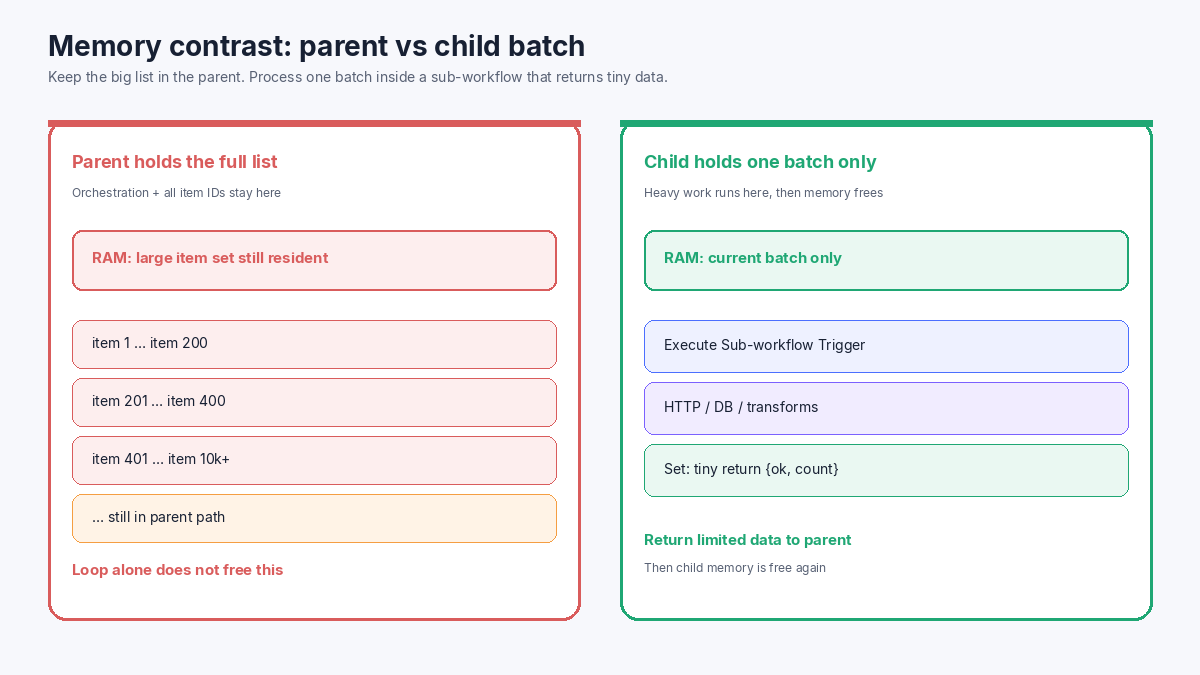
Teams assume: batch size 50 means the parent only ever holds 50 items. Official fix memory issues guidance says otherwise.
If heavy HTTP, file, or Code work stays in the parent, those outputs stay on the parent execution. The Loop node still saves original incoming data. The done path can recombine a large result. Parent memory stays high even while you "batch."
Community threads match that pain for large sets and silent Docker deaths:
- Handle large data sets without slowing down
- OOM while processing 10k-15k items in batches, no error in execution (Docker)
Symptoms to watch:
Execution stopped at this node (n8n may have run out of memory while executing it)Problem running workflow, connection lost, or 503- Server logs:
Allocation failed - JavaScript heap out of memory - Docker or Cloud process restart with a green or missing UI trail
The pattern that works: Loop + Execute Sub-workflow
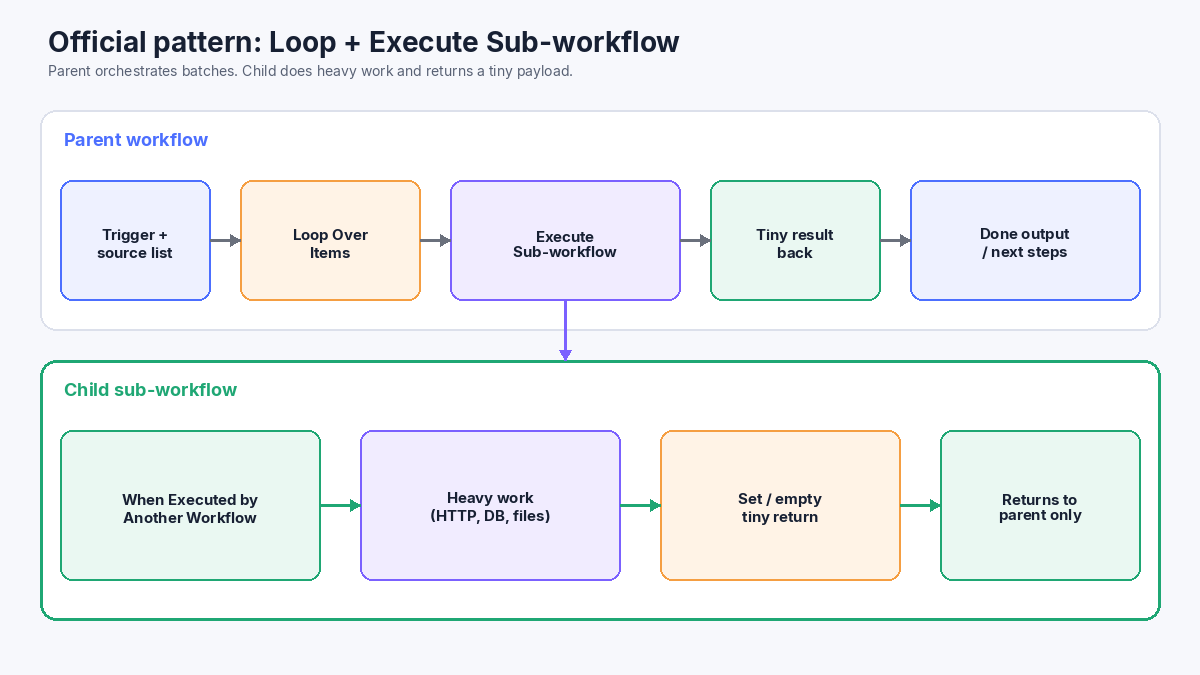
n8n's own memory page recommends:
- Split data into smaller chunks.
- Avoid the Code node when possible.
- Avoid manual executions for large data (the UI keeps an extra copy).
- Split into sub-workflows that return a limited amount of data to the parent.
The counter-intuitive part is adding Loop Over Items plus Execute Sub-workflow. That is correct when the child does the heavy work and returns a small result. The child holds only the current batch. After it finishes, that memory is free again. The parent keeps orchestration state, not every transformed row.
See also the Execute Sub-workflow node and break workflows into smaller parts.
Build the parent
- Load or receive the full item list (IDs, URLs, or row keys). Prefer thin items over full payloads.
- Add Loop Over Items. Start with a modest Batch Size (for example 20-100). Tune from logs, not guesswork.
- From the loop output, add Execute Sub-workflow (also called Execute Workflow in older labels). Pass only the current batch.
- Wire the sub-workflow result back into the Loop input so the next batch runs.
- Use the done output for summary steps that need a small aggregate, not a second full dump of every row.
Mode tip on Execute Sub-workflow: Run once with all items for the current batch is usually what you want when the Loop already sized the batch.
Build the child
- Start with Execute Sub-workflow Trigger (When Executed by Another Workflow).
- Choose an input mode: fields below, JSON example, or accept all data. Match what the parent sends.
- Do HTTP, database, file, or transform work here.
- End with a Set node (or empty) that returns something tiny, for example
{ "ok": true, "processed": 50, "batchIndex": 3 }. - Remember: the last node of the child is what returns to the parent. If the last node is a fat HTTP response, the parent gets that fat payload again.
Optional: after debugging, disable saving successful production executions on the child so high-volume batch runs do not inflate storage.
Self-hosted heap, Docker silence, and Cloud limits
On self-hosted n8n, raise available RAM at the host, or set V8 old space with NODE_OPTIONS=--max-old-space-size=SIZE when logs show heap OOM. That buys headroom. It does not replace the sub-workflow pattern.
Docker often restarts the process after OOM. The UI may never paint a failed node. Read container logs first. On n8n Cloud, memory follows plan limits; see Cloud data management. Upgrade helps, but return size still matters.
Other pressure sources from the docs: binary size, node count, concurrent workflows, and heavy Code. Prefer native nodes for large transforms when you can.
If a long job also waits on humans or webhooks, keep waits off the hot batch path. See Wait node resume URLs and Respond to Webhook timeouts. For agent tools that fail quietly, use an Error Workflow. For a different production tutorial style, see the LazyAds media-buying post.
Practical OOM checklist
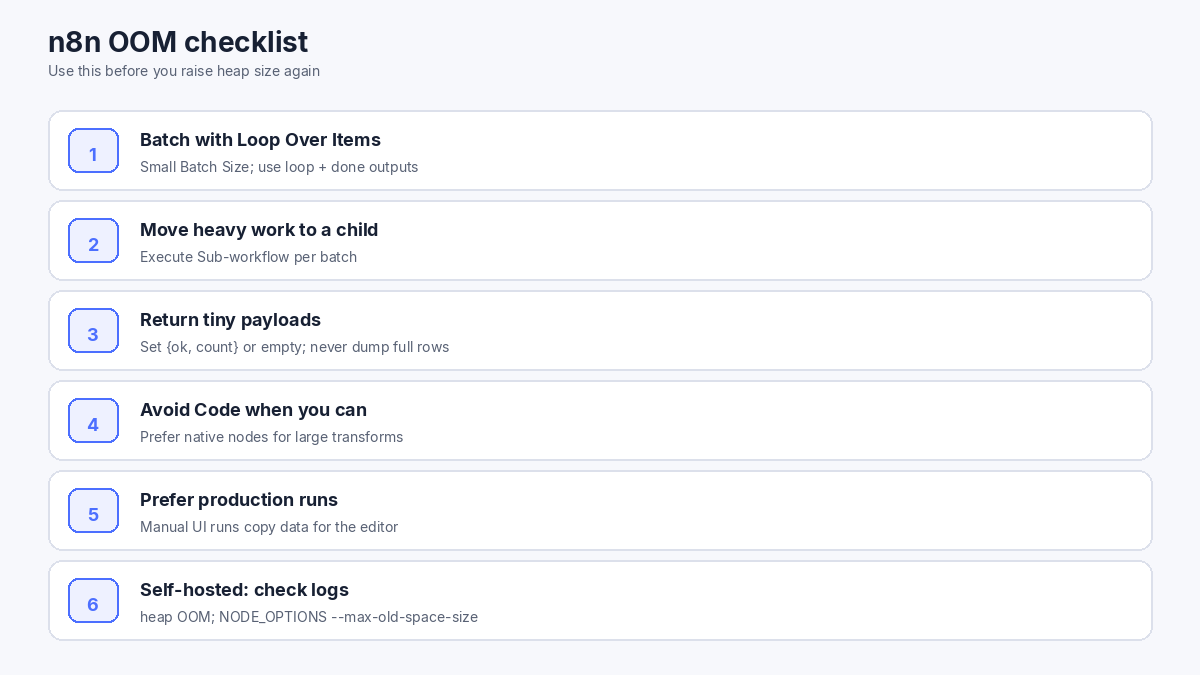
- Thin the parent item shape before the Loop.
- Set a deliberate Batch Size and verify with
currentRunIndex/noItemsLeft. - Call Execute Sub-workflow from the loop output.
- Return only status/count (or empty) from the child.
- Avoid recombining full rows on the done path unless required.
- Prefer production executions over huge manual UI runs.
- Check Docker/host logs for heap OOM before you only raise
--max-old-space-size.
Scaffold the parent and child with n8nChat
n8nChat is a Chrome and Firefox extension that turns a prompt into a graph on the official n8n canvas. It is not a replacement for n8n.io. Open the parent workflow as context, bring your own OpenAI or Gemini key, and ask for concrete node edits.
Example prompts:
> Add Loop Over Items with batch size 50 after the source. From the loop output, add Execute Sub-workflow. Wire the result back into the Loop. Use the done output only for a summary Set.
> Create a child workflow starting with When Executed by Another Workflow. Accept the batch items, run HTTP Request per item, end with a Set that returns only ok and processed count.
> This parent still OOMs. Find nodes that return full payloads to the parent and replace them with a tiny Set before returning.
Review every node, add credentials, and pin a small sample batch before you run the full list. More on the homepage, n8n AI, workflow builder, Chrome extension, and changelog. Install from the Chrome Web Store or Firefox Add-ons.
Wrap-up
n8n loop over items out of memory usually means the parent still owns too much data. Loop Over Items batches work; it does not empty parent RAM. Follow the docs pattern: Loop Over Items → Execute Sub-workflow → tiny return. Put heavy work in the child. Keep the parent thin. Check Docker logs when the UI stays quiet. Raise heap only after the graph is honest about what it keeps in memory.
Frequently asked questions
Does Loop Over Items free parent memory by itself?
No. The node batches items, but the parent still holds orchestration state and any large data you keep on the parent path. Official guidance is to run heavy work in a sub-workflow that returns limited data.
What is the recommended pattern for large item sets?
Use Loop Over Items to create small batches, call Execute Sub-workflow for each batch, do the heavy lifting in the child, and return only a tiny Set result (or empty) to the parent. The child holds the current batch, then that memory is free again.
Why does Docker die with no error in the execution UI?
Self-hosted and Docker instances can hit JavaScript heap out of memory and restart. Community reports show silent OOM while processing large batches. Check container and host logs for Allocation failed - JavaScript heap out of memory.
What should the sub-workflow return to the parent?
Return a limited payload. A Set node with ok, processed count, and maybe an id list is enough. Do not pass the full transformed rows back unless the parent truly needs them.
What are noItemsLeft and currentRunIndex for?
Use $(\"Loop Over Items\").context[\"noItemsLeft\"] to see if batches remain, and $(\"Loop Over Items\").context[\"currentRunIndex\"] for the current loop index. They help with termination checks and logging.
Should I raise NODE_OPTIONS --max-old-space-size first?
You can allocate more V8 old space on self-hosted n8n, and Cloud plans have higher memory tiers. Fix the graph first: smaller chunks, sub-workflows, tiny returns, and avoid heavy Code nodes when possible.
Does saving every child execution make OOM worse?
Storing full success data for every child run increases database and disk pressure. For high-volume batch children, consider disabling save of successful production executions on the child after you finish debugging.
Build workflows with the n8nChat Chrome extension. Also see n8n AI and the n8n workflow builder.