n8n MCP Media Buying with LazyAds (Webhooks + REST Spend Alerts)
<!-- Images live in the sibling folder n8n-mcp-media-buying-lazyads/: hero.png, webhook-rest-flow.png, mcp-vs-rest.png, spend-guardrail.png. Body refs are filename-only. -->
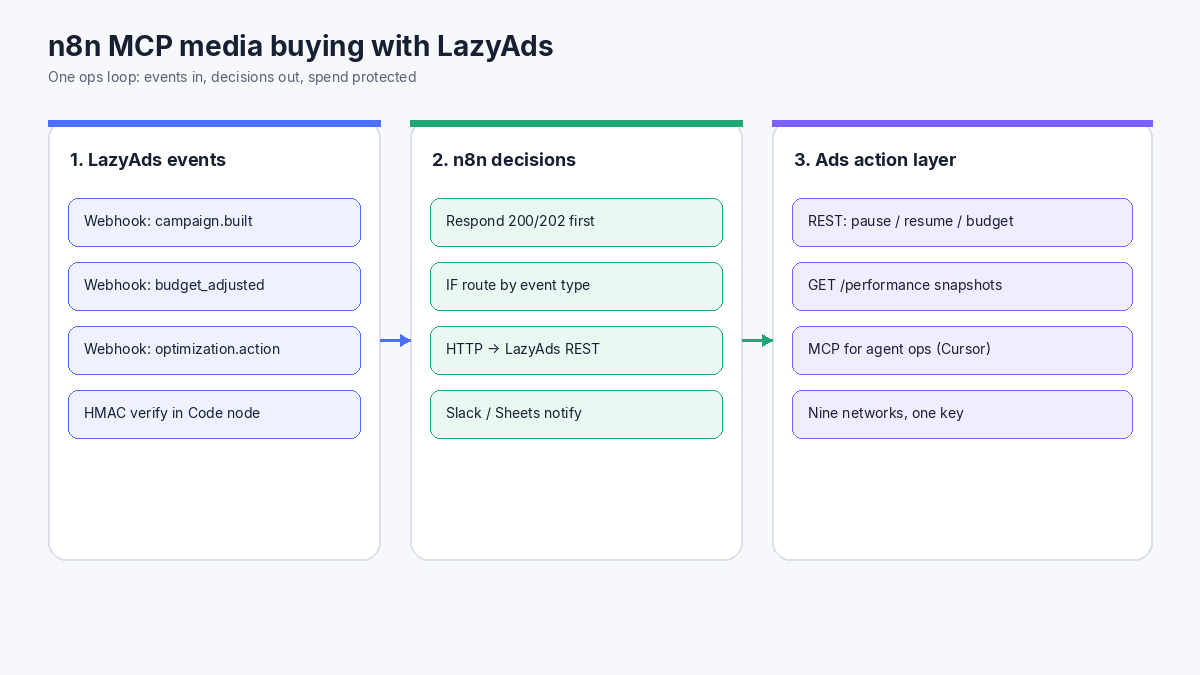
Media buyers who live in n8n want a single ops loop: an event arrives, spend is checked, a campaign pauses or a budget moves, and Slack hears about it. Wiring Meta, Google, TikTok, and five more consoles by hand is the wrong loop. LazyAds is an AI-powered multi-network ad platform with a hosted MCP server, a REST API, and signed webhooks you can plug into n8n.
Disclosure: LazyAds (lazyads.ai) is owned by the same operator behind n8nChat. This tutorial still sticks to public docs: MCP, REST API, and webhooks. No invented endpoints.
You need <a href="https://n8n.partnerlinks.io/n8nchat" rel="sponsored">n8n Cloud or self-hosted n8n</a> to run the graph. That n8n link is a sponsored affiliate link.
Target keyword and what this guide covers
Search interest for n8n mcp is stronger than sparse phrases like “n8n facebook ads” or “n8n media buying.” This post targets the long-tail n8n MCP media buying under that umbrella, then teaches a real workflow:
- Use LazyAds MCP for agent-side campaign ops (Cursor / Claude / Hermes).
- Use LazyAds webhooks + REST inside n8n for production automation.
- Ack webhooks fast, verify HMAC, route events, pause or adjust budget, alert Slack.
- Add a scheduled spend guardrail on
GET /performance.
MCP vs REST: pick the surface that fits n8n
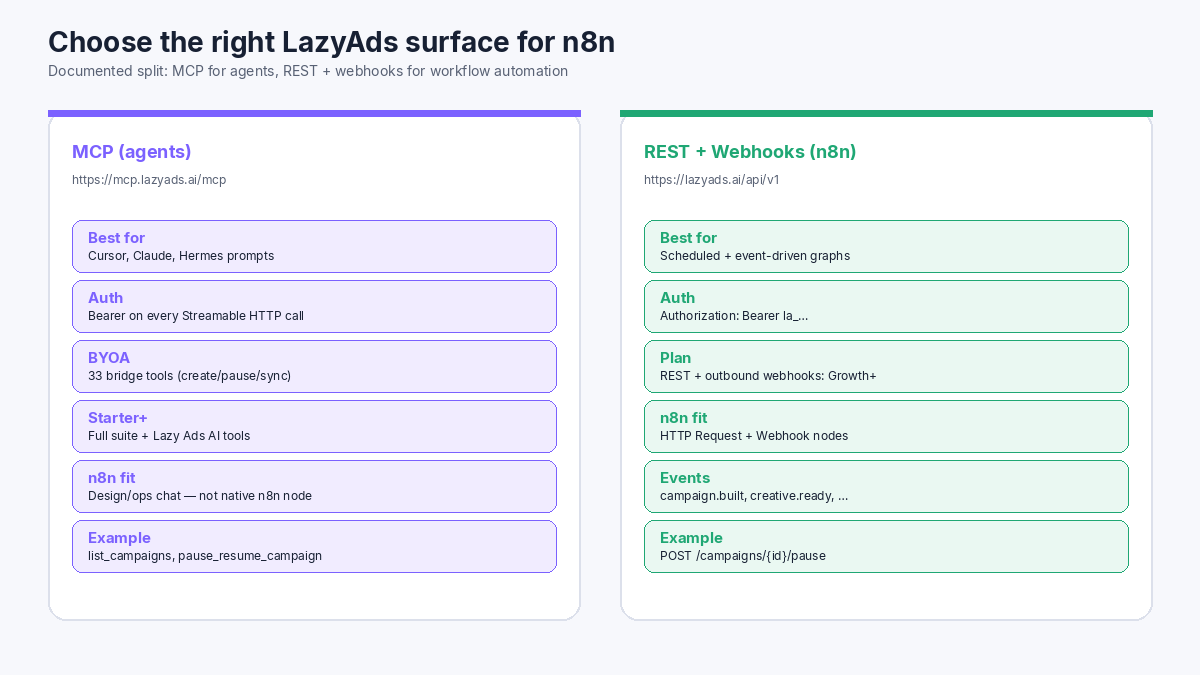
LazyAds documents two automation surfaces. Treat them as complementary, not interchangeable.
| Surface | Endpoint | Best fit | Plan gate (public docs) | | --- | --- | --- | --- | | MCP | https://mcp.lazyads.ai/mcp | Agent clients: Cursor, Claude Desktop, Hermes, Windsurf | Bridge from BYOA; full AI tools from Starter+ | | REST | https://lazyads.ai/api/v1 | n8n HTTP Request nodes | Growth+ | | Webhooks | Register via Settings or POST /api/v1/webhooks | n8n Webhook node as target | Growth+ for outbound webhooks |
MCP uses Streamable HTTP. A typical client block looks like this (from the LazyAds MCP page):
{
  "mcpServers": {
    "lazyads": {
      "url": "https://mcp.lazyads.ai/mcp",
      "headers": {
        "Authorization": "Bearer your-api-key"
      }
    }
  }
}
Bridge tools (every paid plan including BYOA) include operational verbs such as list_campaigns, pause_resume_campaign, set_campaign_budget, sync_all_campaign_performance, and get_ad_spend_summary. Starter+ adds Lazy Ads AI tools such as build_ai_campaign and get_optimization_suggestions. n8n does not need those tool names as native nodes for this tutorial. For scheduled and event-driven graphs, call the matching REST routes instead.
Generate the key under Settings → API on a paid plan. Free workspaces do not receive MCP or REST keys.
Build the production n8n media-buying workflow
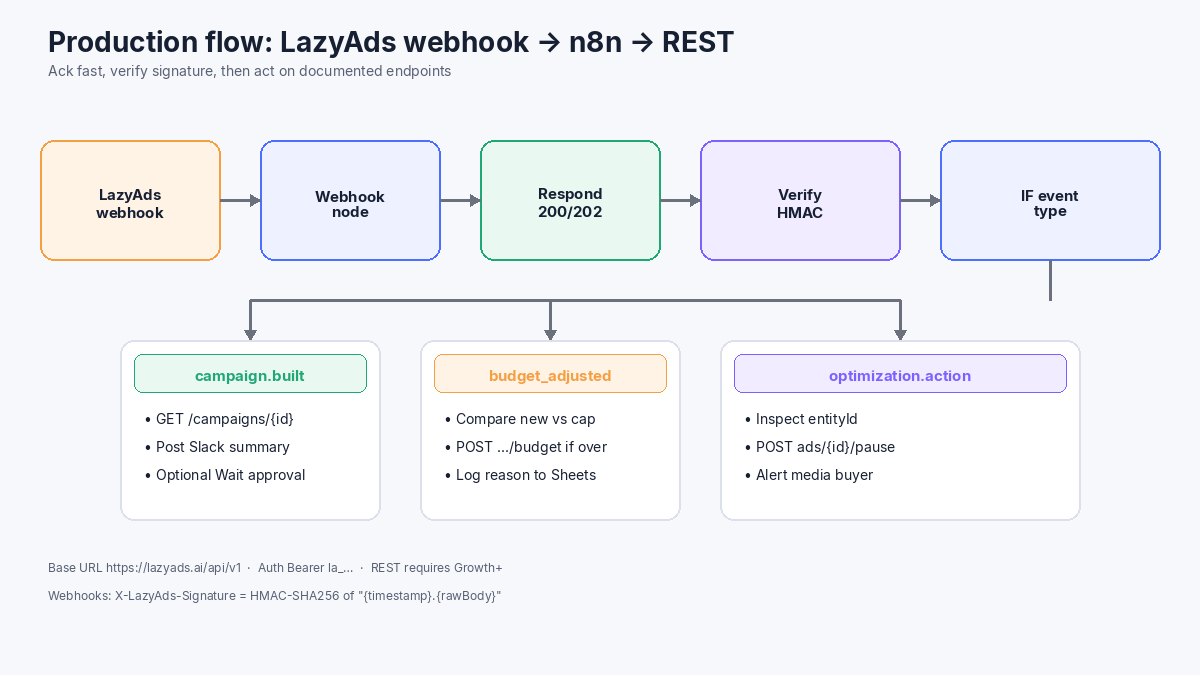
1. Create the Webhook and respond immediately
Add a Webhook node. Use POST. Copy the production URL.
Set Respond to Using 'Respond to Webhook' Node. Place Respond to Webhook right after you have stored the raw body (status 200 or 202, body { "ok": true }). That pattern matches the timeout guidance in n8n Respond to Webhook: ack first, then do HTTP and Slack work.
If a later step needs a human approval pause, use a Wait node with a runtime resume URL rather than blocking the original LazyAds delivery. See n8n Wait Node webhook resume URLs.
2. Register the webhook with LazyAds
LazyAds documents Zapier/n8n-style REST Hooks. With a Growth+ API key:
curl -X POST https://lazyads.ai/api/v1/webhooks \
  -H "Authorization: Bearer $LAZYADS_API_KEY" \
  -H "Content-Type: application/json" \
  -d '{
    "url": "https://YOUR_N8N_HOST/webhook/lazyads-ops",
    "events": [
      "campaign.built",
      "campaign.launched",
      "campaign.budget_adjusted",
      "creative.ready",
      "optimization.action_taken"
    ]
  }'
Store the returned signing secret once. Delivery headers include X-LazyAds-Signature, X-LazyAds-Timestamp, and X-LazyAds-Event. Full event shapes live on the webhooks docs.
3. Verify the HMAC in a Code node
Keep Raw Body available on the Webhook path. In a Code node, recompute HMAC-SHA256 of ` ${timestamp}.${rawBody} with the endpoint secret and compare to X-LazyAds-Signature`. Reject missing signatures and timestamps older than a few minutes. Only then parse JSON and branch.
Route with an IF or Switch on X-LazyAds-Event (or body.type):
campaign.built/campaign.launched→GET /campaigns/{id}, Slack summarycampaign.budget_adjusted→ comparenewBudgetto your hard cap → maybePOST /campaigns/{id}/budgetoptimization.action_taken→ inspectaction/entityId→ optionalPOST /ads/{id}/pausecreative.ready→ logfileUrland predicted score to Sheets
4. Call documented REST actions
Base URL: https://lazyads.ai/api/v1. Header: Authorization: Bearer la_your_api_key.
Useful media-buying calls from the REST reference:
| Action | Method and path | | --- | --- | | List campaigns | GET /campaigns | | Campaign detail | GET /campaigns/{id} | | Pause / resume campaign | POST /campaigns/{id}/pause · POST /campaigns/{id}/resume | | Set campaign daily budget | POST /campaigns/{id}/budget | | Pause ad / ad set | POST /ads/{id}/pause · POST /ad-sets/{id}/pause | | Performance snapshots | GET /performance | | Creative library | GET /creatives |
Example pause node (HTTP Request):
- Method: POST
- URL:
https://lazyads.ai/api/v1/campaigns/{{$json.data.campaignId}}/pause - Authentication: Header Auth with your LazyAds key
- On success: Slack message with campaign name, platform, and execution URL
Do not invent Meta Graph paths here. LazyAds syncs pause and budget to the connected network when the object is live and writable.
5. Add the scheduled spend guardrail
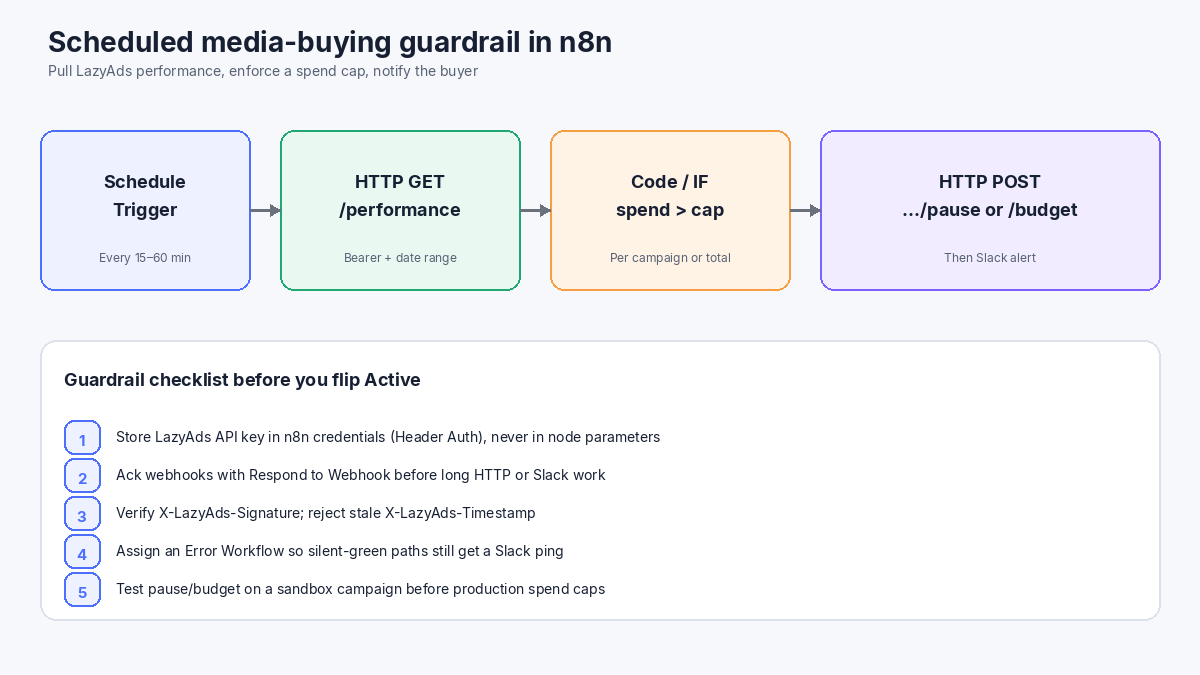
Duplicate the decision core into a second workflow:
- Schedule Trigger every 15–60 minutes.
- HTTP Request
GET https://lazyads.ai/api/v1/performancewith your date filters. - Code or IF when spend exceeds a per-campaign or account cap.
- HTTP Request
POST /campaigns/{id}/pauseorPOST /campaigns/{id}/budget. - Slack (or email) with the reason and a link to the LazyAds dashboard.
Assign an Error Workflow so production failures still notify you when a node actually fails. If you later wrap REST calls as AI Agent tools, assert the tool JSON and throw on empty or failed payloads so the Error Trigger can fire.
Use LazyAds MCP beside n8n (not instead of it)
Keep MCP for interactive media buying. In Cursor or Claude, after connecting https://mcp.lazyads.ai/mcp, try prompts such as:
- “List platform connections and which networks can spend.”
- “Sync all campaign performance, then summarize spend by platform.”
- “Pause campaign cmp_… and set daily budget to 40 USD on the LinkedIn prospecting campaign.”
Those map to documented bridge tools. Use n8n for the always-on webhook and schedule paths above. Use MCP when a human (or coding agent) is in the loop. Pricing for BYOA, Starter, Growth, and Scale is on lazyads.ai/pricing.
Debug and fix the graph with n8nChat
n8nChat is a Chrome/Firefox extension that builds and edits workflows from chat on the official n8n canvas (Cloud or self-hosted). Bring your own OpenAI or Gemini key. Open the media-buying workflow as context, then ask for concrete graph edits—not a separate hosted n8n.
Example prompts:
> Webhook receives LazyAds events. Set Respond to Using 'Respond to Webhook' Node. Add Respond to Webhook with 202 immediately after the Webhook. Keep HMAC verify and HTTP Request nodes after that.
> After HMAC verify, add a Switch on X-LazyAds-Event for campaign.built, campaign.budget_adjusted, and optimization.action_taken. Each branch needs an HTTP Request to https://lazyads.ai/api/v1 with Bearer auth.
> Schedule Trigger every 30 minutes, GET /performance, IF total spend over {{$vars.DAILY_CAP}}, POST /campaigns/{{id}}/pause, then Slack. Add Error Workflow assignment notes in a sticky.
> This execution stayed green but Slack never fired. Show where to assert HTTP status and throw so the Error Workflow runs.
Pin a real webhook payload (from LazyAds delivery logs or a test POST) and run node-by-node before you activate.
Practical checklist
- Paid LazyAds plan with the surface you need (MCP vs Growth+ REST/webhooks).
- API key in n8n credentials, not hard-coded in expressions.
- Webhook registered; secret stored; HMAC verified.
- Respond to Webhook before slow work.
- Only documented
/api/v1paths for pause, budget, and performance. - Error Workflow linked; test on a low-risk campaign first.
- MCP client connected for interactive ops when you want agent control.
Wrap-up
n8n MCP media buying is not “paste Meta tokens into twenty nodes.” It is a split stack: LazyAds MCP for agent verbs, and LazyAds REST + webhooks for the n8n graphs that protect spend while you sleep. Start with webhook verify + pause/budget + Slack, add the scheduled performance guardrail, then keep MCP for the interactive session where strategy still needs a human in the loop.
Frequently asked questions
Does n8n call LazyAds MCP natively?
Not as a first-class native node in this guide. LazyAds documents MCP for Streamable HTTP clients such as Cursor, Claude Desktop, Hermes, and Windsurf. For n8n production graphs, use the documented REST API and webhooks with HTTP Request and Webhook nodes.
Which LazyAds plan do I need for n8n automation?
REST API access and outbound webhooks start at Growth. MCP bridge tools start at BYOA. Full MCP with Lazy Ads AI tools starts at Starter. Free accounts do not get an API key for MCP or REST.
What is the LazyAds MCP endpoint?
Production MCP is https://mcp.lazyads.ai/mcp. Authenticate with Authorization Bearer (or X-API-Key) on every request using a key from Settings → API.
How do I verify LazyAds webhooks in n8n?
Read X-LazyAds-Signature and X-LazyAds-Timestamp. Compute HMAC-SHA256 of \"{timestamp}.{rawBody}\" with your endpoint secret and compare with a timing-safe check. Reject stale timestamps, then route on X-LazyAds-Event or body.type.
Can this workflow pause live Meta or Google campaigns?
Yes, when those ad accounts are connected in LazyAds and the campaign is linked. Documented REST routes such as POST /campaigns/{id}/pause sync to the live platform. You still need your own advertiser accounts on each network.
Should I put an AI Agent on the webhook critical path?
No. Acknowledge with Respond to Webhook first, then run HTTP or agent work. That avoids gateway timeouts and double-fires from client retries. Pair the graph with an Error Workflow for production alerts.
Build workflows with the n8nChat Chrome extension. Also see n8n AI and the n8n workflow builder.