n8n Code Node Returns Only One Item: Modes, Return Format, and Item Linking
<!-- Images: hero.png, modes.png, split-vs-aggregate.png, checklist.png -->
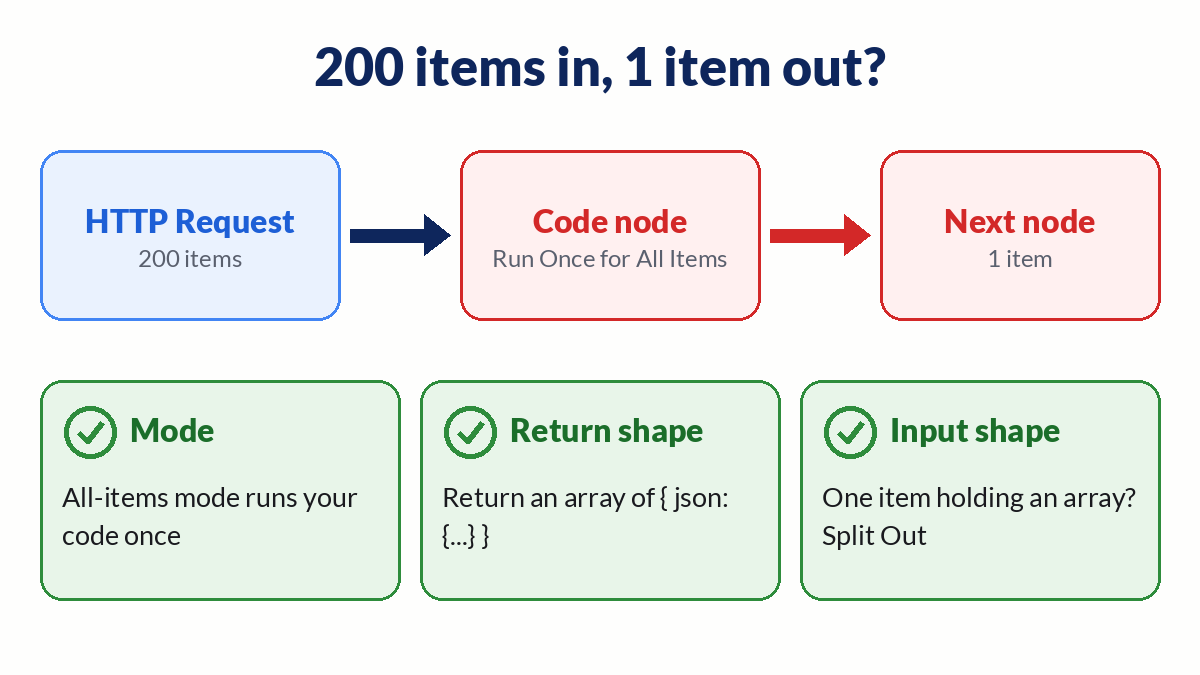
Your HTTP Request node outputs 200 items. The Code node after it outputs one. There is no error, and the run is green.
This exact question shows up on the forum again and again. One user put it simply: "There is no execution error, but the item count changes from multiple items to one" (community.n8n.io thread).
The cause is almost always one of three things: the node mode, the shape of what you return, or the shape of what came in. This guide walks through each one, then covers item linking, native Python, and task runner timeouts. You need n8n Cloud or self-hosted n8n to follow along. That n8n link is a sponsored affiliate link.
How the two Code node modes work
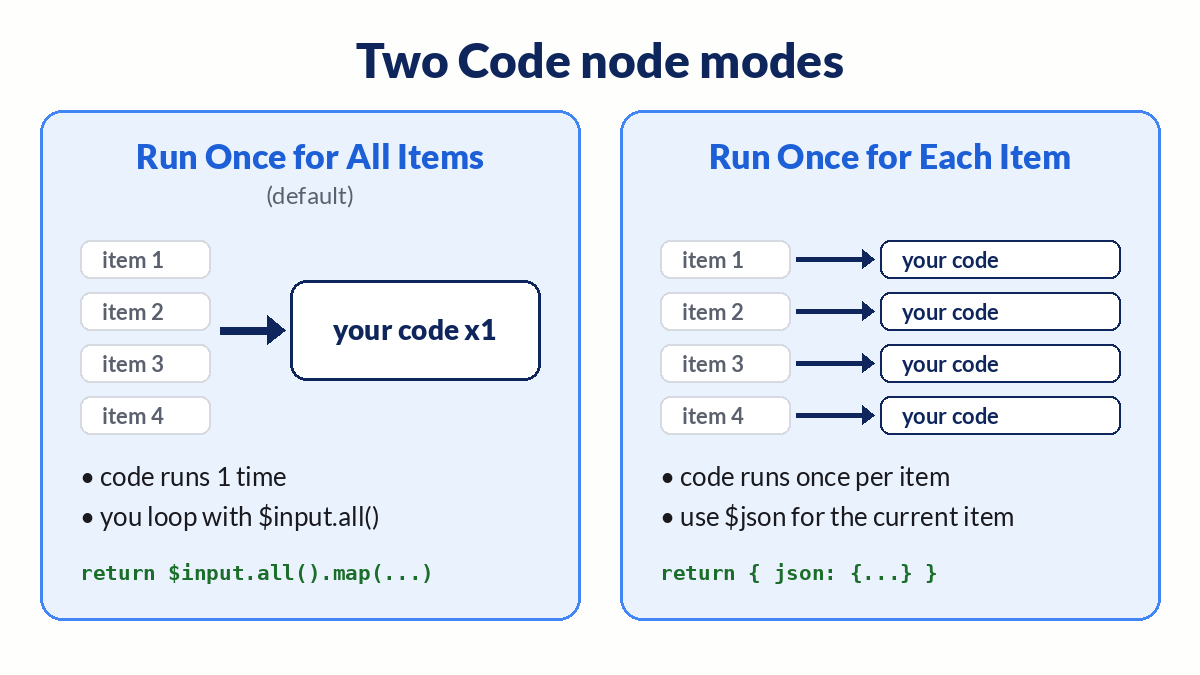
The Code node docs list two modes:
- Run Once for All Items. This is the default. Your code runs one time, no matter how many items come in.
- Run Once for Each Item. Your code runs once per input item.
In all-items mode you are responsible for every item. If your code reads $input.first() or builds a single object, you get a single item out. n8n does not loop for you.
Fix 1: return an array in all-items mode
Map over every input item and return the whole array. Each element needs a json key that points to an object.
// Mode: Run Once for All Items
return $input.all().map(item => ({
  json: {
    id: item.json.id,
    name: item.json.name,
  },
}));
Common ways this goes wrong:
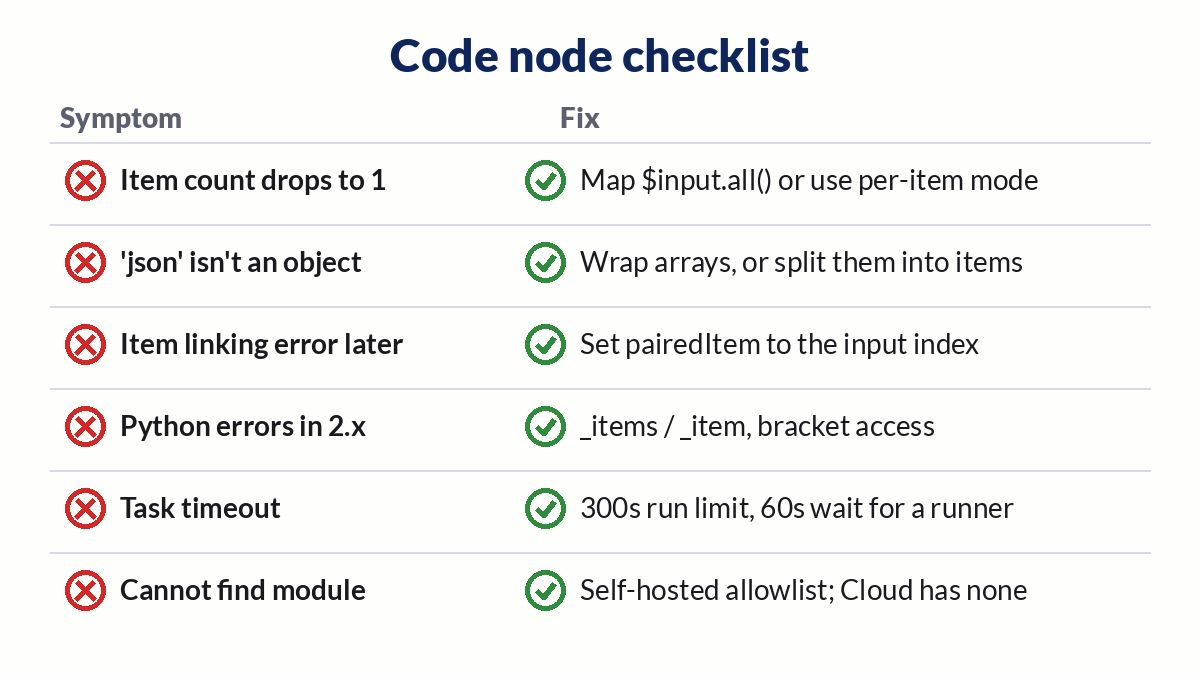
return { json: {...} }returns one item.return [{ json: { results: list } }]returns one item that holds an array.const first = $input.first()reads only item 0.return listwhere each element is missing thejsonwrapper can throw "Code doesn't return items properly".
The common issues page also lists "A 'json' property isn't an object". That one means you set json to an array. Wrap the array in an object, or split it into items.
Fix 2: switch to Run Once for Each Item
If your logic is per record, change the mode. Then return one object, and n8n collects the results for you.
// Mode: Run Once for Each Item
return {
  json: {
    id: $json.id,
    name: $json.name,
  },
};
This mode is easier to read. It also runs your code once per item, so for very large lists the all-items mode with a single map is usually lighter. If memory is the real problem, see our guide on Loop Over Items running out of memory.
Fix 3: check what actually came in
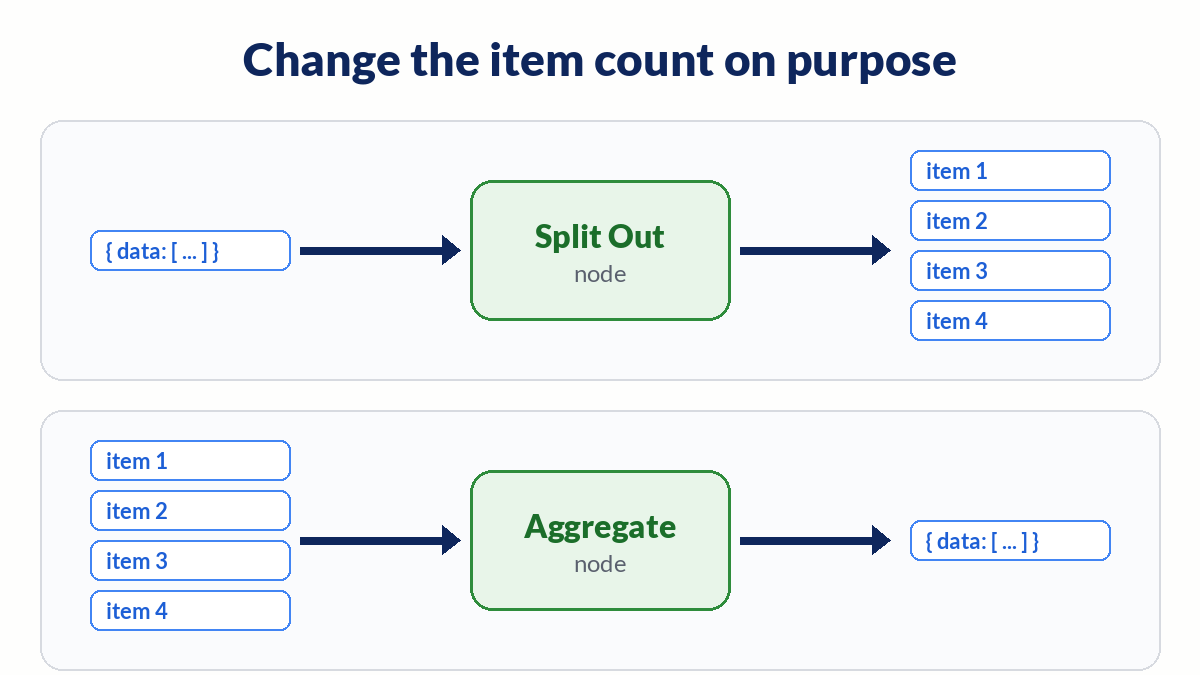
Open the input panel of the Code node and look at the item count. Many APIs return one response with an array inside, like { "data": [ ... ] }. The HTTP Request node then outputs one item, and your Code node is doing the right thing with it.
You have two options:
- Add a Split Out node on the
datafield before the Code node. You get one item per record. - Do it in code:
const rows = $input.first().json.data || [];
return rows.map(row => ({ json: row }));
Going the other way, if you want 200 items rolled into one, use the Aggregate node rather than custom code. If the API also pages its results, our HTTP Request pagination guide shows how to collect every page first.
Keep item linking intact with pairedItem
Later nodes often reach back with $('Node Name').item. That only works if each output item knows which input item produced it. n8n handles this on its own for most nodes. The item linking docs say you must set it yourself in a Code node when you add new items, return new items, or want manual control, and only when more than one item comes in.
return $input.all().map((item, i) => ({
  json: { name: item.json.name, tag: 'new' },
  pairedItem: i,
}));
If you skip this and a downstream expression uses .item, you can hit an item linking error even though the Code node itself ran fine.
Native Python in n8n 2.x
Pyodide, the old browser-style Python, is removed in n8n 2.0. Native Python runs on task runners and has a few rules the docs spell out:
- Use
_itemsin all-items mode and_itemin per-item mode. Other built-in variables are not supported. - Use bracket access:
item["json"]["name"], notitem.json.name. - On n8n Cloud you cannot import libraries, not even the standard library.
The same return rule applies. Return a list of dicts that each have a "json" key.
# Mode: Run Once for All Items (native Python)
return [{"json": {"id": item["json"]["id"]}} for item in _items]
Task runner timeouts and other errors
Code nodes run on task runners. The task runner environment variables set two limits worth knowing on self-hosted n8n:
N8N_RUNNERS_TASK_TIMEOUTstops a task after 300 seconds by default.N8N_RUNNERS_TASK_REQUEST_TIMEOUTlets a task wait 60 seconds by default for a free runner.
If a heavy script hits the first limit, move slow work out of the Code node or split the input into batches. If every Code node times out, even in an empty workflow, the runner is not reachable. Several Cloud users reported this in August 2026 (forum thread). That is an instance problem for n8n support, not a bug in your code.
Two more errors from the docs:
- Cannot find module. Self-hosted only. Install the module and allow it with
NODE_FUNCTION_ALLOW_BUILTINandNODE_FUNCTION_ALLOW_EXTERNAL. n8n Cloud only offerscryptoandmoment. - Credentials not available. Code nodes cannot read credentials by design. Use an HTTP Request node for authenticated calls.
When a Code node fails in production, an Error Workflow can alert you with the node name and message.
Debug the Code node on your canvas
n8nChat is a browser extension that works on the official n8n canvas. Open the workflow, then ask why the Code node returns one item. It reads the open workflow as context, so you can tell it to rewrite the code with $input.all().map(...) or add a Split Out node in front. You can also describe a job in a prompt and it builds the graph on the canvas.
It runs on your own OpenAI or Gemini key. It does not replace n8n, and it cannot fix a Cloud task runner outage. See AI for n8n, the workflow builder, the Chrome extension page, and the changelog. Install for Chrome or Firefox.
Disclosure: the n8n link in this post is an affiliate link. If you sign up through it, n8nChat may earn a commission at no extra cost to you.
Frequently asked questions
Why does my n8n Code node output only one item?
The node is in Run Once for All Items mode, which is the default, and your code returns a single object or reads only the first item. Map over $input.all() and return an array, or switch the mode to Run Once for Each Item.
What format must a Code node return?
An array of objects where each object has a json key that points to an object, like [{ json: { id: 1 } }]. In Run Once for Each Item mode you return one object with a json key.
My HTTP Request node shows one item with an array inside. How do I split it?
Use the Split Out node on the array field, or return the array elements as separate items from a Code node. The Code node only sees what the previous node outputs, so one item with an array is still one item.
When do I need pairedItem in a Code node?
When you create new items or return a different number of items than you received, and a later node uses $('Node Name').item to look back. Set pairedItem to the index of the input item that produced each output item.
How is native Python different from the old Python mode?
Pyodide was removed in n8n 2.0. Native Python uses _items in all-items mode and _item in per-item mode, needs bracket access like item['json']['name'], and does not support the other built-in variables. On n8n Cloud it cannot import libraries.
Why does my Code node time out on a task runner?
Self-hosted task runners stop a task after N8N_RUNNERS_TASK_TIMEOUT, 300 seconds by default, and a task request waits N8N_RUNNERS_TASK_REQUEST_TIMEOUT, 60 seconds by default, for a free runner. If even an empty Code node times out on Cloud, the runner itself is likely down, so contact n8n support.
Can I use credentials or npm packages in a Code node?
Credentials are blocked by design, so use an HTTP Request node for authenticated calls. Self-hosted n8n can allow npm modules with NODE_FUNCTION_ALLOW_BUILTIN and NODE_FUNCTION_ALLOW_EXTERNAL. n8n Cloud only offers crypto and moment.
Build workflows with the n8nChat Chrome extension. Also see n8n AI and the n8n workflow builder.